
Need Help SD8C845FG-HNF Not Communicating
- Thread starter Captain_B
- Start date
You are using an out of date browser. It may not display this or other websites correctly.
You should upgrade or use an alternative browser.
You should upgrade or use an alternative browser.


Thank you, wittaj and BigRedFish, for your input and suggestions. I did a hard reset, and now I'm having trouble connecting to the PTZ. I have tried the following:
With the NVR already powered on, I power up the PTZ, which is connected to the mid-span, which is connected to the POE switch, which is connected to the Cisco switch, which is connected to the NVR and to all the computers in the office and router. Result: when connecting to the NVR Web Interface, there is no listing for a new camera, and the old location on the list still shows the PTZ, which it should, and it has a red dot, like any camera that is not connected or communicating with the NVR. When I try to do anything with the NVR Web Interface, it gives me an error message: "Timed Out".
With the NVR powered off, I power up the PTZ, which is connected to the midspan that is connected to the POE switch. I try to connect using the NVR's web address. It tries to connect but never reaches the PTZ Web Interface page where you enter the username and password.
With the NVR powered off, I connect the mid-span data port directly to the Cisco switch, power on the PTZ, and try to connect using the NVR web address. It tries to connect but never reaches the PTZ Web Interface page where you enter the username and password.
Any suggestions would be appreciated.
With the NVR already powered on, I power up the PTZ, which is connected to the mid-span, which is connected to the POE switch, which is connected to the Cisco switch, which is connected to the NVR and to all the computers in the office and router. Result: when connecting to the NVR Web Interface, there is no listing for a new camera, and the old location on the list still shows the PTZ, which it should, and it has a red dot, like any camera that is not connected or communicating with the NVR. When I try to do anything with the NVR Web Interface, it gives me an error message: "Timed Out".
With the NVR powered off, I power up the PTZ, which is connected to the midspan that is connected to the POE switch. I try to connect using the NVR's web address. It tries to connect but never reaches the PTZ Web Interface page where you enter the username and password.
With the NVR powered off, I connect the mid-span data port directly to the Cisco switch, power on the PTZ, and try to connect using the NVR web address. It tries to connect but never reaches the PTZ Web Interface page where you enter the username and password.
Any suggestions would be appreciated.
I’m not sure I follow
What is the IP you’re trying to connect to with the NVR powered off?
You can’t connect to the 10.1.1.x ips except through the NVR web UI
What is the IP you’re trying to connect to with the NVR powered off?
You can’t connect to the 10.1.1.x ips except through the NVR web UI
And a factory reset would put it back to 192.168.1.108 and your computer would need to be on that subnet to reach the camera.
I just got back in the office this morning, and I want to start by saying a BIG THANK YOU to BigRedFish and Wittaj for all the advice and help. Without you, I would have been lost in trying to figure this out. The camera is working great now, and I will leave it running for a while to make sure it stays operational before returning it to its mount on the tree. I do have a question and a small issue. I updated my NVR software, and everything works great, but the 2 big PTZs (sisters), one of which happens to be the one we just got back working again. Since both of them will no longer display live on the NVR Wed Interface but display perfectly on the SmartPSS program, and the only change is the updated software on the NVR, it appears to be related to that. All the cameras on the system display fine in the Live NVR Web Interface, except these two PTZs. Below is the NVR updated information. Any thoughts on how to fix this?
NVR32CH-8XI
Web Version V5.22.0.251120.8633129
ONVIF Server Version 24.12(V3.1.0.2263113)
ONVIF Client Version V2.4.1
System Version V4.005.0000000.1.R, Build Date: 2025-12-02
Thank you again, gentlemen, for all your help and time.
Captain B
NVR32CH-8XI
Web Version V5.22.0.251120.8633129
ONVIF Server Version 24.12(V3.1.0.2263113)
ONVIF Client Version V2.4.1
System Version V4.005.0000000.1.R, Build Date: 2025-12-02
Thank you again, gentlemen, for all your help and time.
Captain B
It is likely the plug in is broke. You could delete the plug in extentions in the browser and then let the NVR download the plug-in again from the camera.
But we have also seen situations where the update breaks it and nobody has found the solution except going back to previous firmware.
But we have also seen situations where the update breaks it and nobody has found the solution except going back to previous firmware.
Yeah, I have a number of cameras I ahve to access using Palke Moon 64 browser that wont display using IE/Edge
The whole plugin whack a mole game gets tiring. Try a different browser
The whole plugin whack a mole game gets tiring. Try a different browser

I feel like browser compatibility could be something they could easily fix. Not sure why they haven’t spent the time to do that though.
I feel like browser compatibility could be something they could easily fix. Not sure why they haven’t spent the time to do that though.
This question is asked enough times, that it is sadly well-documented why.
It comes down to IE was the most popular browser when these cameras started to be made, so they centered the firmware around one particular browser and they got lazy and never updated the internals of the program to play nice with other browsers as more became available and IE started to fade.
Back when the firmware was written, it was probably a pain to get it to play nice with every different browser, so they went with the most popular one.
They haven't had a need to address this because their intended market (remember it isn't us) is mainly businesses where they have enough light they can stay in default settings so they don't have a need to login to the camera via browser. It is us homeowners that push these to the limits and actually change settings.
As long as their intended market simply uses the NVR as a recording device and to display it on a monitor, they have no need to change what works for their intended market.
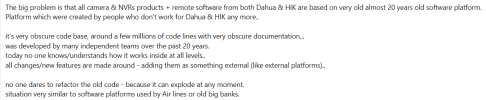
Further, Steve1225, who is an installer and works closely with Dahua, said it best here in this post:
I was able to get the camera back installed on the tree and it is working great; all issues resolved except trying to create IVS rules with no video from the camera in the Cameras GUI/Web interface. I did try Pale Moon and the video works, but the video doesn't show in the actual Graphic Box but above and to the left, but it allows/shows the graphic you are drawing (Trip Wire or Intrusion) but when I click "Apply" it says, "Please Draw Graphic". Any suggestions would be appreciated.
Thank you Wittaj, BigRedFish and Chase for all the suggestions and help. I appreciate your time and willingness to share your experience with those in need. Again, thank you for all your help, much appreciated.
Captain B
Thank you Wittaj, BigRedFish and Chase for all the suggestions and help. I appreciate your time and willingness to share your experience with those in need. Again, thank you for all your help, much appreciated.
Captain B

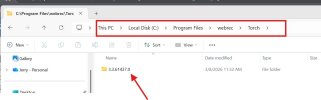
Sometimes I have had to go in and remove versions in the torch folder. This can happen when you run the camera's webplugin.exe software of another Dahua cam and they conflict with each other. Just delete the webrec folder and then access your camera using Edge and do not install plugin and see if it works. if it doesn't then try to install the plugin. Like Bigredfish stated, it's a whack a mole approach 

For what it's worth....back when I was new ...I bought my first PTZ IP cam from an Amazon vendor in China "jidetech".Good explanation. That’s just poor business decisions to not adapt to changing technologies. IE has been extinct for YEARS now.
I wouldn’t complain as much if we could use smart pss to make ivs and other technical adjustments.
It had the " Internet Explorer issue" and didn't work properly with Chrome to show the boxes with images.
Once I got the camera, they began offering (via email) another free cam in exchange for a product review on Amazon.
I agreed, and got the Dome ptz turret and reviewed it. Since I had them on the line...( so to speak),
I asked the representative why the weren't making these products to work with new browsers.
She wouldn't answer that directly, but said they were only allowed to use Internet explorer at work with the cameras.
So I'm thinking the Active x plugin bullcrap/game is the way they "backdoor" the cams to spy on their citizens and of course anywhere else the cams are running.
If they give tha up they can't do their spying. Maybe? anybody? Bueller? Ferris Bueller?