Need Help SD8C845FG-HNF Not Communicating

Captain_B

Getting comfortable
Jan 12, 2021
163
253
United States
Hello Gentlemen,

I need your help with my PTZ Dahua SD8C845FG-HNF. The camera has worked great since I got it new from Andy back in October of 2022, but it has stopped communicating with the NVR. The camera powers up, completes its standard diagnostic testing, and goes to its programmed location. It even tracks me like it's supposed to. The IR lights turn on and off at the correct intervals; everything is perfect except that it does not communicate with the NVR. I have replaced the mid-span PFT1200, but still no joy.

Any suggestions for fixing it myself, or ideas on who to send it to for repairs? Thank you for your help.

Captain B
 
Have you tried deleting it from the NVR and re-adding it?

Have you tried a different NVR port?

Have you tried taking it offline of the NVR and power it via a POE switch and log in directly to the camera?
 
Sounds like Power isn't an issue with a midspan and it going through startup routine, IR, tracking etc

When you say it wont communicate, how do you know?

Is it missing from the list of cameras on the registration page?

Is it connected to a POE port of the NVR or connected to a switch?
 
Thank you, Wittaj & BigRedFish, for your response and suggestions. As always, you two come through with great questions. I made it back home a little bit ago and brought the PTZ into my office, where the NVR is, along with the inbound fiber optic converters from the different hub locations around the property. This PTZ was operating from one of the fiber-optic hubs (Area C), so I removed it from its location, brought it to the office, and plugged it directly into one of the Dahua POE switches via an additional mid-span power supply. After powering up and running its diagnostics, I saw on the NVR Web page that it was showing green instead of red but was missing the camera's name and a few other things, so I tried to connect via the NVR Web page to its IP address, no joy. I then tried it directly from the internet, and after thinking for a few seconds, it let me in and operated fine. I then went back to the NVR web page, and it now showed the camera name and related information. I shut down my direct web connection, then went through the NVR web page, and it connected fine.

Yesterday, while at the PTZ's original hub location (Area C), I tried several POE switch ports and different Cat 7 cables to see if that might be the issue, but no joy there either. The way I knew it wasn't communicating with the POE switch in Area C was that the green light that blinks on each port when connected wasn't lit. Any thoughts on what I should do now?
 
The temporary issue connecting via the NVR page could simply have been the camera not quite finished loading various modules and the web service

I’ve seen them take quite a few minutes

Bad connector or cable?
Try another known good cam at the location to verify ?
Swap midspan?

Not knowing the pain in the ass factor at the location, I’d leave it on the bench for a day and maybe power cycle it once or twice and see how it does
 
Pain in the ass on this one is big. Very heavy PTZ, aluminum ladder stretched to the max to 20 feet to get to the mounting location on a tree on the side of a mountain, pulling it up with a rope and hanging/mounting it, life and death for a guy my age. I have the PTZ running here in the office; I will run it all night and day tomorrow and do some additional power cycling to see if I can get the issue to raise its head again. I did use the Cat 7 connector tester that hooks at each end of the run, and there were no issues. I also ran a different Cat 7 cable to try that, but no joy. I would try a different camera, but I don't have another PTZ that's not in use.

Thank you, BigRedFish.
 
  • Like
Reactions: bigredfish
ughhh I feel your pain.

Not sure I'm much help but as it has been running ok and recently quit running ok that makes it hard to troubleshoot.
 
Keep in mind the tester only test continuity, not the ability to run POE.

If I had to guess, I would say the NVR or POE Switch (not sure if you have two devices or interchanging the name) is losing efficiency and for the big PTZ and the run, it is having trouble.

I would look at trying a POE++ or higher injector and see if it solves it.
 
How long has this camera been installed for? Did you update the firmware recently?
Are you using outdoor rated cable?
Are you keeping the RJ45 connections watertight?
Maybe try a new switch
 
Keep in mind the tester only test continuity, not the ability to run POE.

If I had to guess, I would say the NVR or POE Switch (not sure if you have two devices or interchanging the name) is losing efficiency and for the big PTZ and the run, it is having trouble. The NVR is a NVR32CH-8XI and uses a POE switch for the cameras in Area A that are close by. The PTZ along with several other cameras are in a different area of the property that has its own POE switch that the PTZ connects via going through the mid span (PFT1200) that powers the PTZ. The POE switch feeds into a Intellinet Gigabit Ethernet Media Convertor that connects to fiber optic that travels to another media convertor located at the NVR before going into a Cisco gigabit switch. Do you think there's an issue with the switch at the PTZ even though the mid span is powering the PTZ?

I would look at trying a POE++ or higher injector and see if it solves it.
 
How long has this camera been installed for? Camera was installed in 2023 Did you update the firmware recently? No firmware updates on anything since purchase.
Are you using outdoor rated cable? Yes
Are you keeping the RJ45 connections watertight? Yes
Maybe try a new switch I'm wondering as well but I tried the ports the other cameras are working on and still no joy.
Thank you, Chase, for the reply, much appreciated.
 
How's it doing so far?
BigRedFish:

I have the camera hanging in a closet from a clothes rack. Everything was going great until I decided to turn it around, facing out the door, where it is bright, and then repowered it a few minutes ago. When I try to view the video via the NVR Web interface, it shows 13,198 kbps, and the error message says "Limited resources, Failed to play videos." I've never had that error message before. Even the SmartPSS won't show video from the PTZ video.

Now, I turn the lights off, close the door, and it allows me to connect to the PTZ; it shows video at 20 kbps, but the screen is dark. I turn on the lights, and the picture starts to pixelate, the kbps drop to 0, and the picture freezes. I have this PTZ's sister running at 20,000 kbps with the same settings and no issues at all. Think I should try updating the camera's software or doing a reset? Any advice would be much appreciated.
 
  • Like
Reactions: bigredfish
Yeah that don’t sound right.

Couldn’t hurt to do a firmware update if one is available, then factory default

But honestly it sounds like it’s possessed.

If you bought victim Andy I’d ask him to have the Dahua people remote in and look around, but it sounds like a camera SOC problem

At this point I’m out of my lane. I have 4-5 PRZs including an older 6 series with the laser IR and can’t say I’ve come across anything quite like this
 
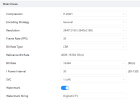
Interesting issue to say the least. In the closet with the lights on, a solid 5,000 to 7,000 kbps. As I increase the shutter speed from 10 to 100, the kbps roll in the 16,000 to 19,000 range. Then I increase the shutter to 450, and it's nice and bright light daylight, and the camera locks up at 20,735 kbps. Return the camera to a darker image, and the video starts back up. The sister camera runs at 16,000 to 19,000 kbps with no issues and the exact same settings. The camera encoding is as follows:

1775682872316.png
 
We just see too many people screw up a device by updating thinking that will fix a problem thst just started.

Your device was working and now isn't. Either the firmware corrupted and needs reset or a part broke are the likely issues.