
Continuous recording not continuous.
- Thread starter Mjorgy68
- Start date
You are using an out of date browser. It may not display this or other websites correctly.
You should upgrade or use an alternative browser.
You should upgrade or use an alternative browser.


Let's see:

- You just joined today.
- Your first post you tell us you know there's a help file but you don't care to read it.
- You asked for help, so here ya go...
I see, so no help from the group then. Funny, I actually did go to the help file and it said I was doing everything right. And in other forum, same thing. so if anyone else who can identify with this issue, please let me know if you found a solution.Let's see:
Read the help file and you still need help, come back and tell us what you tried but still can't get it.
- You just joined today.
- Your first post you tell us you know there's a help file but you don't care to read it.
- You asked for help, so here ya go...


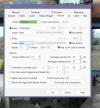
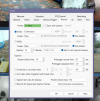
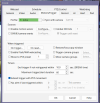
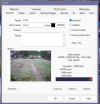

That was very helpful. Thank You!

Bruce_H
Getting comfortable
OK, you say you only get 20 min's, does it record another 20 mins after that or do you have to restart the system to get it to record again?
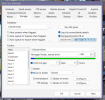
Can you post your storage settings for "New"
I would suggest that you try to set the "Combine or cut video each: to some setting that works for you 12 or 24hrs and see if this fixes your problem, you may want shorter times if the individual files get really big!!
Here is what the help file says about that setting
The Combine or cut video option exists to combine events into fewer files when recording
when triggered, but it also cuts video into segments for the other recording modes. For when
triggered, un-check this option in order to have one file recorded for each event. Although
you may choose whether or not to create new files on a timed basis, you must always specify a
maximum size for a file before a new one is created.
If the cut time specified is 5 minutes or more and equally divides a day, such as 10, 20, or 30
minutes, or 1, 2, 3, 4, 6, 8, or 12 hours, recording will be aligned to the realtime clock. That
is, if you have a cut time of 12 hours, yet start recording at 11am, a new file will be created
at 12pm to cover 12pm-12am. The Blue Iris BVR file format allows for appending and
continuation across camera or software restarts, however, so this effect will be mitigated
when possible.
Can you post your storage settings for "New"
I would suggest that you try to set the "Combine or cut video each: to some setting that works for you 12 or 24hrs and see if this fixes your problem, you may want shorter times if the individual files get really big!!
Here is what the help file says about that setting
The Combine or cut video option exists to combine events into fewer files when recording
when triggered, but it also cuts video into segments for the other recording modes. For when
triggered, un-check this option in order to have one file recorded for each event. Although
you may choose whether or not to create new files on a timed basis, you must always specify a
maximum size for a file before a new one is created.
If the cut time specified is 5 minutes or more and equally divides a day, such as 10, 20, or 30
minutes, or 1, 2, 3, 4, 6, 8, or 12 hours, recording will be aligned to the realtime clock. That
is, if you have a cut time of 12 hours, yet start recording at 11am, a new file will be created
at 12pm to cover 12pm-12am. The Blue Iris BVR file format allows for appending and
continuation across camera or software restarts, however, so this effect will be mitigated
when possible.
It restarts from time viewedOK, you say you only get 20 min's, does it record another 20 mins after that or do you have to restart the system to get it to record again?
Can you post your storage settings for "New"
I would suggest that you try to set the "Combine or cut video each: to some setting that works for you 12 or 24hrs and see if this fixes your problem, you may want shorter times if the individual files get really big!!
Here is what the help file says about that setting
The Combine or cut video option exists to combine events into fewer files when recording
when triggered, but it also cuts video into segments for the other recording modes. For when
triggered, un-check this option in order to have one file recorded for each event. Although
you may choose whether or not to create new files on a timed basis, you must always specify a
maximum size for a file before a new one is created.
If the cut time specified is 5 minutes or more and equally divides a day, such as 10, 20, or 30
minutes, or 1, 2, 3, 4, 6, 8, or 12 hours, recording will be aligned to the realtime clock. That
is, if you have a cut time of 12 hours, yet start recording at 11am, a new file will be created
at 12pm to cover 12pm-12am. The Blue Iris BVR file format allows for appending and
continuation across camera or software restarts, however, so this effect will be mitigated
when possible.
Attachments

mat200
IPCT Contributor
- Jan 17, 2017
- 18,547
- 31,078
So, you all have been very helpful, and It's time to let er rip and see what I get, I already have an hour on camera so I will go to the settings on the other cameras and adjust them as well.
Thanks @Mjorgy68
Once you've confirmed you got it working,
Do let us know what was the issues and how you were able to resolve it.
Bruce_H
Getting comfortable
25 GB is very small for the new folder when doing continuous record in my estimation! Is stored on the same drive, if so then you are just wearing out your drive moving files from one place to the other, you should consider just using the new folder and make it a big as possible, forget about moving them to stored!It restarts from time viewed
I didn't realize that was the size of the folder I honestly don't know what I thought. The drive itself is 900Gb, and there are three separate drives, all 900Gb that handle the Storage and Alert files. I Will make that much larger. Thank you.25 GB is very small for the new folder when doing continuous record in my estimation! Is stored on the same drive, if so then you are just wearing out your drive moving files from one place to the other, you should consider just using the new folder and make it a big as possible, forget about moving them to stored!