How the heck do I get IVS to trigger Blue Iris?

IReallyLikePizza2

Known around here
May 14, 2019
2,586
5,994
Houston
For the life of me I can't get it to trigger. Any ideas?

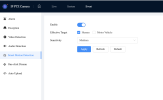
I have my PTZ auto-tracking with IVS, and I'd love those to show up as alerts in BI

1775189473883.png

1775189498134.png

1775189513095.png
 
Sometimes after playing with the IVS setting within the camera, I have to run the Find/inspect again within BI to get the alerts functioning properly again.
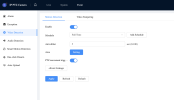
Since this is a new camera, you may check that Onvif user is active on the cameras account setting.
I had one camera that was not providing alerts until I turned on BI's built in motion sensor along with Onvif/camera events under the Motion/Trigger tab. Onvif started triggering and when I unchecked the "motion sensor", it continued to function well, providing Onvif alerts only
 
Last edited:
No luck there, do I need to reset the Onvif password to the same as admin? I've not touched it
 
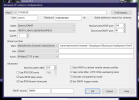
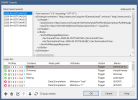
Hit the find/inspect and post the pop up window - it could be the ONVIF password issue.
 
Looks good to me unless I'm missing something, I deleted my presets because they had names in them

Opening 10.0.60.39 port 80...
HTTP Get / request...
OK
ONVIF GetSystemDateAndTime
2026-04-04T15:50:15.000Z
Requesting device information...
Manufacturer: General
Model: PTZ425DB-AT-R
FirmwareVersion: 3.200.0000014.0.R
GetCapabilities...
Querying services
Has Imaging services: /onvif/imaging_service
Has media services: /onvif/media_service
Has RTP_RTSP_TCP, requesting profiles
profile token MediaProfile00000
profile name MediaProfile_Channel1_MainStream
profile source is 00000
profile token MediaProfile00001
profile name MediaProfile_Channel1_SubStream1
profile source is 00000
profile token MediaProfile00002
profile name MediaProfile_Channel1_SubStream2
profile source is 00000
requesting URI for profile MediaProfile00000
RTSP URI: rtsp:/10.0.60.39:554/cam/realmonitor?channel=1&subtype=0&unicast=true&proto=Onvif
requesting URI for profile MediaProfile00001
RTSP URI: rtsp:/10.0.60.39:554/cam/realmonitor?channel=1&subtype=1&unicast=true&proto=Onvif
requesting URI for profile MediaProfile00002
RTSP URI: rtsp:/10.0.60.39:554/cam/realmonitor?channel=1&subtype=2&unicast=true&proto=Onvif
Has Event services: /onvif/event_service
Has WSPullPointSupport
RelayOutputs: 1
RelayOutput: 00000/Bistable/open
InputConnectors: 2
Has Device IO services: /onvif/deviceIO_service
AudioOutputs: 1
Has PTZ service: /onvif/ptz_service
Preset: 1=Left Sidewalk
Preset: 2=Right Sidewalk
deleted
Done

This shows up in the ONIFV events so it seems to work to some degress
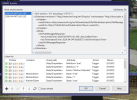
1775317924158.png
 
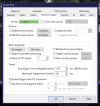
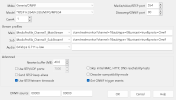
Okay I made some progress, by enabling the below I get alerts into BI no problem. The issue its its all motion alerts, and not just for people. Unsure how to proceed really, disabling motion detection also disables smart detection

Enabling this

1775351338170.png

And this

1775351351945.png
 
Here is mine. Looks like difference is buffer and the 5 zeros in the 2nd ONVIF box. Try that.

1775352559110.png
 
What I found on my Dahua PTZ camera is that if you manually move the camera at all from the programmed preset position, it will not create an ONVIF trigger. Verify that you select the preset position where you set up events, and leave it there. It is always something I have to do after manually panning the camera.
 
  • Like
Reactions: VorlonFrog
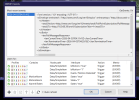
Had the same problem with my cameras, andy responded with name each IVS rule in the camera and set up a trigger in BI that looks for the name. That was the only way BI would trigger and needed the 00000 in the second ONVIF source as wittaj mentioned.
But hey, if just a newbie :)
 
name each IVS rule in the camera and set up a trigger in BI that looks for the name

Very interesting, are you able to share the BI config for that?
 
Very interesting, are you able to share the BI config for that?
Probably not doing this right as I am still learning but I set up one ivs rule to alert for animals at night, three tripwires entering driveway, in parking lot, and right at the mandoor.
Works for me but what do I know, it might not next week...
I am sure there will be someone that will point out how it should be done but thats why were here right..

Good luck..
1775403875803.png
 
That did it! Not sure if it was the extra 00000 or not, I'll delete either one and test again and report back
 
  • Like
Reactions: VorlonFrog