
Blue Iris Remote WAN address changes after system reboot?

Nick3399

n3wb
Jun 24, 2018
17
1
Nc
Hi All,

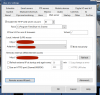
I have been having issue where everytime system reboots, the Remote WAN address changes, and I have to go into blue iris app and modify to allow me to view cameras while off wifi. Is there any way to keep the remote WAN address the same? I do not have the box checked to refresh, so I am not sure why it is constantly being updated after reboot.
 

Attachments

  • Screen Shot 2021-10-01 at 4.15.35 PM.png
    Screen Shot 2021-10-01 at 4.15.35 PM.png
    94.3 KB · Views: 20
IS you BI PC using DHCP or is it using a manually configure IP address?
 
I could be wrong but I think the setting, 'Refresh external IP at Startup and again every [30 mins]' should be checked.

I do not have a static WAN IP, it changes at the whim of my ISP and so I believe it is this setting that keeps things in check.

It is a slight pain in as I have to update my VPN connection on the phone, but that only seems to be every 6 or 8 weeks, and I'll have to do it now after noticing that my WAN IP has again changed.
 
AFAIK your WAN IP address could change if you a) don't have a static IP from your ISP, and b) your router/modem rebooted. It won't be affected by blueiris reboots.

You can probably ask your ISP to give you a static IP, so it doesn't change. If they can't/won't, then you'd need to "refresh external ip at startup" as pointed out above, and use a dynamic dns (dyndns) service so you can access your system using a name rather than an ip address.
 
  • Like
Reactions: TonyR
Did you ever figure this out? I finally got around to setting up access to BI over a VPN. On my Android phone the app behaves fine, but on my wife's iphone I set it to the machine address through the VPN tunnel, it will work, and then the WAN address changes to something completely different after a while (assuming my external IP but have not validated). I just want it to remember the setting I put in place, is there an option I'm missing on the iOS app?
 
Did you ever figure this out? I finally got around to setting up access to BI over a VPN. On my Android phone the app behaves fine, but on my wife's iphone I set it to the machine address through the VPN tunnel, it will work, and then the WAN address changes to something completely different after a while (assuming my external IP but have not validated). I just want it to remember the setting I put in place, is there an option I'm missing on the iOS app?
Your external IP will change from time to time, that is why people use a DNS service (Dynamic Name Service) there is a section in the help about using a dynamic DNS system from BI using the last part of your serial number have you looked at that in the BI help?
 
Your external IP will change from time to time, that is why people use a DNS service (Dynamic Name Service) there is a section in the help about using a dynamic DNS system from BI using the last part of your serial number have you looked at that in the BI help?
So the IP the BI app needs won't change, I mentioned I'm using a VPN, the other config on the iPhone takes care of connecting to said VPN. All the blue iris app needs to do is connect to the local machines address within the VPN. If I put that in the app it works for a bit... But then somehow the app updates itself to a completely different IP. I need to stop that second part from happening. This only happens on my iPhone not my Android, both using the same VPN
 
So the IP the BI app needs won't change, I mentioned I'm using a VPN, the other config on the iPhone takes care of connecting to said VPN. All the blue iris app needs to do is connect to the local machines address within the VPN. If I put that in the app it works for a bit... But then somehow the app updates itself to a completely different IP. I need to stop that second part from happening. This only happens on my iPhone not my Android, both using the same VPN
Sorry, I don't have an I-Phone or use the BI app, I only use UI3 and the Open VPN server built into my Asus Routers, it works flawlessly for me!
 
Is there a tutorial regarding the setup of a DNS? I’m running noip as a service but, the WAN keeps changing in the app and I’m having to manually enter my IP in the app almost every time I open it.
 
No-Ip offers a domain name, right? Have your BI server run the client to update the IP and then use the domain name in the app.
Do I use the host name in the lan or wan? Does it matter? Should I look it up at each login? Does my host name need to be entered on the webserver tab of BI? Sorry. Busy week.
 
Do I use the host name in the lan or wan? Does it matter? Should I look it up at each login? Does my host name need to be entered on the webserver tab of BI? Sorry. Busy week.
Do I use the host name in the lan or wan? - LAN can be direct IP assuming your Blue Iris rig is set up with a static IP on-prem in your home. For WAN use the domain name.
Should I look it up at each login? - Why would you need to? The domain name won't change.
Does my host name need to be entered on the webserver tab of BI? - No, I didn't have to enter anything in BlueIris. The insecure way to set this up is simply port forward the BlueIris port in you router to that machine. I'd feel ok doing as a test but don't leave as a long-term solution. The secure way would be a VPN but that's a whole other tutorial that should have it's own thread. I use WireGuard as a free VPN that the user sets up on their own, but you'll want to do some reading about how this works and general networking concepts.
 
  • Like
Reactions: International784
Do I use the host name in the lan or wan? - LAN can be direct IP assuming your Blue Iris rig is set up with a static IP on-prem in your home. For WAN use the domain name.
Should I look it up at each login? - Why would you need to? The domain name won't change.
Does my host name need to be entered on the webserver tab of BI? - No, I didn't have to enter anything in BlueIris. The insecure way to set this up is simply port forward the BlueIris port in you router to that machine. I'd feel ok doing as a test but don't leave as a long-term solution. The secure way would be a VPN but that's a whole other tutorial that should have it's own thread. I use WireGuard as a free VPN that the user sets up on their own, but you'll want to do some reading about how this works and general networking concepts.
I’m using ZeroTier and trying to get it to jive with NOIP. My Netgear router recognizes the host name and login information from noip. It’s just not playing nice with ZT though.