SmartPSS Lite causing hangs or crashes on windows pc running 24/7

drakejest

Young grasshopper
Sep 9, 2022
68
12
Asia
Im using a small dell Optiplex computer to display to a monitor all my 32cameras 24/7. I am using smartPSS Lite in full screen to do, problem is after awhile several hours sometimes days. the windows pc crashes black screen (but display is on, monitor is not showing no display so there is video signal its just black). Tried diagnosing the cause of the crash, but even windows is unable to tell me why.

Are there other programs i can use to display my cameras onto a monitor? i think that smartPSS lite is just bad, currently im testing out the old SmartPSS to see if it still crashes.
 
I've used smartPSS and lite on several machines over 8 years. Sometimes smartPSS would crash, especially the older versions, but I've never once associated a windows crash with any of them.
 
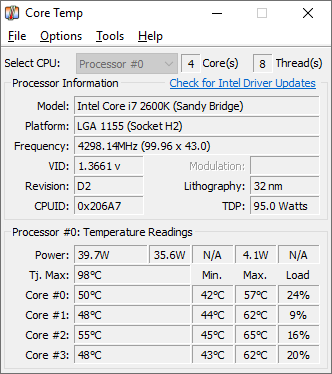
Maybe your hardware is experiencing a thermal issue ( the PC) gets stressed out with 32 streams 24/7 before the CPU/GPU hits a critical temp. Make sure everything is running cool. look up your processor on intel site and see what version of Graphics hardware your running, and see if there are any older or newer drivers for it.
Some pc's will report there temps in a utility software.


1773815897657.png
 
Maybe your hardware is experiencing a thermal issue ( the PC) gets stressed out with 32 streams 24/7 before the CPU/GPU hits a critical temp. Make sure everything is running cool. look up your processor on intel site and see what version of Graphics hardware your running, and see if there are any older or newer drivers for it.
Some pc's will report there temps in a utility software.


View attachment 240201
Trust me when i say i checked everything, I ran temp logs never went past 60C moments at the crash (CPU was stable at 75C but it should have no problem with that) replaced and reformatted the NVME SSD, replaced the ram, replaced the powersupply. The only thing left is the CPU and motherboard. The crash is so bad that windows is unable to dump any logs of it (which makes it very likely hardware problem).

What is weird that just the computer idling, just turned on doing nothing but showing the desktop, it doesn't crash. So its something do with what im doing and the only culprit is smart PSS, though i cant definitely say its the program, because it might as well be what the program is demanding from the hardware. I actually ordered another identical model so i can definitely say that its really the hardware, because if i get the same behavior on the second machine, then something is wrong.
 
  • Like
Reactions: Flintstone61
I;m not computer guru so most specs turn into gobblety gook mush, but I;m running an older Win 11Pro HP laptop
12th Gen Intel(R) Core(TM) i7-1255U
16 GB RAM

I run SmartPSS Lite (newish version) all day in the background,. Sometimes I'll forget to turn it off overnight.
Worst that happens is it shows no video for a few seconds, then will reboot itself. Never a Windows crash

In can't recall ever running it for a week straight though
 
  • Like
Reactions: tigerwillow1
how long do you usually run the smartPSS app ? i was wondering if what im trying to do is too demanding for the app.
Until about 2 years ago when I switched to BI for viewing, I ran smartPSS continuously until it crashed. The computer was on all day and hibernated overnight. What I'm calling a crash would sometimes be a popup saying the program malfunctioned, but more often it just silently terminated. One thing I noticed sometimes was smartPSS gobbling up most of the system memory, a memory leak I presume. In these cases I shut it down and restarted it. Since I view now with BI, I run smartPSS only for short periods as needed.
 
  • Like
Reactions: Flintstone61
Until about 2 years ago when I switched to BI for viewing, I ran smartPSS continuously until it crashed. The computer was on all day and hibernated overnight. What I'm calling a crash would sometimes be a popup saying the program malfunctioned, but more often it just silently terminated. One thing I noticed sometimes was smartPSS gobbling up most of the system memory, a memory leak I presume. In these cases I shut it down and restarted it. Since I view now with BI, I run smartPSS only for short periods as needed.
How is the blue iris program doing you ? Can it be used with dahua cameras? i only need it for viewing and not management
 
I'm doing well with BI. It's hard to make a good apples-to-apples comparison with the NVR because there are so many differences. With the NVR+smartPSS the IVS trip lines are shown on the camera image in blue, then when tripped they momentarily turn red. This feature is totally lost when using BI, a big loss for me. On the other hand, due to some basic software architecture, the NVR+smartPSS starts displaying trigger video when the trigger happens, when what you really want to see happened just before the trigger. You can go back and find the video leading to the trigger but it takes extra work and time. When displaying a trigger event in BI, it starts a few seconds before the trigger happens. (The "few seconds" time is configurable). Another issue is that the NVR is a lot easier to set up. BI is highly configurable, giving it great flexibility, but that brings a lot more complexity. What wins me over is with BI's UI3, scanning through the video clips caused by triggers is lightning fast (hyperbole, I admit) compared to using NVR+smartPSS. BI works just fine with Dahua cameras. It uses ONVIF, not the Dahua private protocol, so some capabilities are lost. The biggest one for me is the one I mentioned, losing the display of IVS trip lines. I have an older NVR, and I expect some of the newer NVR capabilities will also be lost. I'm just not able to speak to that. Wanting the best of everything, I'm running both the NVR and BI. The native BI user interface is somewhat different than UI3, and I'd be less enthusiastic about BI if I were using the native interface. I spend almost all the viewing time using UI3, but when I need to look at something in detail and single step through it, I go to smartPSS. Clunkier to use, but more details available.

Here's another post I made about this previously:
 
How is the blue iris program doing you ? Can it be used with dahua cameras? i only need it for viewing and not management

If you only want to use BI for viewing, it is relatively simple.

And the beauty of BI is it works with Dahua cams and NVRs - you can simply feed the NVR into BI.

BI has a 15 day free trial so download it and see if it works for you.

Here is how to pull the video from an NVR into BI.

In BI, you select add camera and put the IP address of the NVR into the IP address location. Put in username and password and hit find/inspect and let BI do its thing.

Then on that same screen about halfway down is a pull down for Camera number and pick camera 1 and then hit ok. The camera should show up. Then add camera and the select copy and copy this camera and then change the number 1 to a 2 and then repeat for your cameras by selecting add camera and add IP address of NVR and selecting next camera number. So if you have 8 cameras on the NVR, you repeat this process 8 times in BI.

OR depending on your NVR, in BI it may populate all the cameras in the main and substream pulldown boxes and you just select a camera number and then add another camera and select the next pulldown.

Then go into each camera in BI and turn off the Motion detection if you don't want it to manage.

Now the downside is any prior video will need to be viewed from the NVR as BI cannot pull recorded video from the NVR, but for live viewing it is simple.