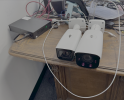
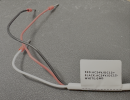
Vigilant Solutions VSR-60-02MP1 IP Camera IPC262ER9-X10DU 24V, 1.5A, 50/60Hz.

Oddly hidden in System: Maintenance, is the Max. Zoom Ratio control.
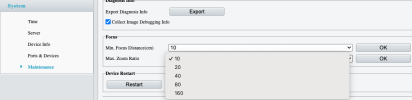
1770857060966.png

Anything greater than 10 appears to be digital zoom, as I can no longer hear motors whirring if I zoom in beyond 10.

I thought maybe the max optical zoom might be a function of the Min. Focus Distance, but the whirring/no-whirring zoom threshold didn't change when I changed the Min. Focus Distance.

So what's the Min. Focus Distance for? Why would I want that adjustable? Wouldn't I always want the maximum possible range?
 
  • Like
Reactions: observant1
Oddly hidden in System: Maintenance, is the Max. Zoom Ratio control.

View attachment 238019

Anything greater than 10 appears to be digital zoom, as I can no longer hear motors whirring if I zoom in beyond 10.

I thought maybe the max optical zoom might be a function of the Min. Focus Distance, but the whirring/no-whirring zoom threshold didn't change when I changed the Min. Focus Distance.

So what's the Min. Focus Distance for? Why would I want that adjustable? Wouldn't I always want the maximum possible range?


Maybe it's there to prevent it from focus hunting.
 
I think there IR lamps have a far and near power setting so that you can get more light into the background w/o blowing out the foreground.
I turned on the "anti-blowout" features, and I got this nice capture:

1770912106936.png

If you step through the video frame-by-frame, you can almost see where we get a keyframe and an exposure/illumination correction, just as s/he poses for us.
 

Attachments

  • 1770912006120.png
    1770912006120.png
    1.2 MB · Views: 1
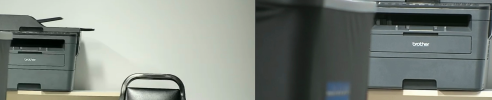
Vigilant VSR-60-02MP1 (bigger, right side of photo, left side of video) and EmpireTech IPC-B52IR-Z12E S2, Side by Side:

1771033303644.png


This is NOT a comparison of "which camera is better?" because they're two different classes of product. The EmpireTech is a pretty modern, Dahua-based camera available on amazon for $250 - $260, whereas the Vigilant unit is an obsolete unit acquired on eBay for $25 - $35.

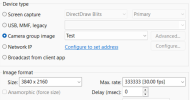
But I'm just illustrating an interesting new feature of Blue Iris ≥ 6.0.2, whereby a named "group" of cameras can be itself used as a "camera source," which allows exporting of side-by-side video like this, in a single step.

I think there are a few bugs to be worked out, especially with regard to the resulting video format and frame rate, but it could be a useful feature.

For example both cameras were set in hardware and in Blue Iris for 1920 x 1080 at 30 fps. The "group" camera's video ends up being 3840 × 2160, which was the only option available at the full combined width, and captures only 5 fps, despite the group camera being set up for 30 fps. Having this group camera enabled adds about 10% to my CPU usage, from ~50% to ~60% average, so it's non-trivial.

1771033351372.png

1771033383200.png

It would also be really nice to be able to zoom both cameras in the group simultaneously, instead of having to go to each individual camera's Live view to control its zoom individually.
 
This is NOT a comparison of "which camera is better?" because they're two different classes of product. The EmpireTech is a pretty modern, Dahua-based camera available on amazon for $250 - $260, whereas the Vigilant unit is an obsolete unit acquired on eBay for $25 - $35.
But, since we've got both up on the screen at the same time, we can see that their FOVs are roughly similar at minimum zoom, but the IPC-B52IR-Z12E S2 can zoom in quite a bit further, and seems to get sharper text. Both cameras were set to Auto, Defaults, and then to 30 fps, and then I tweaked the exposure and contrast on the VSR-60-02MP1 to make it look more like the IPC-B52IR-Z12E. But I didn't to much fiddling, and certainly didn't do any optimization.

1771034045650.png

If I get ambitious next week I might repeat a bit of PeteJ's experiment and put them side by side for LPR in one location where I don't need the extra length of the IPC-B52IR-Z12E.
 
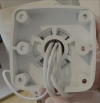
I'm considering using a few of these in outdoor locations. Has anyone found a mounting solution or junction box for these? They have a 6 hole pattern on the back:
1771200618652.png
 
As an Amazon Associate IPCamTalk earns from qualifying purchases.
  • Like
Reactions: TheWaterbug
As an Amazon Associate IPCamTalk earns from qualifying purchases.
Now we just need to figure out how to get +12 V from the POE circuit onto some of the other wires. Unlike every other IP camera I own, this does not have a barrel jack for DC input. It just has 3 wires for:

RED: AC24V/DC12+
BLACK: AC24V/DC12 -
WHITE: GND

1773598353621.png

So the protection is probably done differently, and it may not be as simple as bypassing a diode.
Just for kicks I put a voltmeter across all possible pairs on these wires, and they all measure 0 V, as expected.

Has anyone found a User Manual for these cameras? Googling either model number and PDF results in data sheets and sometimes a quick setup guide, but no legit user manual that specifically mentions this model. Searching on global.uniview.com results in no matches for this model number, and only not-very-close partial matches, e.g. for "IPC232" but not the rest of the string.

The closest match produces a user manual, but it seems pretty generic, and it has same tantalizing options that I, unfortunately, do not see on our cameras, even after ctrl-alt-shift-y to enable the Demo menu:

1773597665621.png

@PeteJ, did you ever poke around on the circuit board when you had your unit open? Did you find 12 VDC anywhere convenient? Are those 3 power wires easily disconnectable from the board where they could then be reassigned to a 12 V source? Is the unit difficult to dis/assemble?

I'm still thinking about how easy/difficult it might be to power an external mic from one of these.
 
Actually there's another listing for another bunch of these. As low as $21.31/each, but there's $10 shipping, but that's still less than the $33.24 I paid last time. I just ordered a few more. I have no need for these, but I can't resist! Once I've set them for DHCP and updated their firmware, they'll be worth at least $34 each!!
Wow! Here's an open-box unit asking $250, from India no less. I should try selling one of my firmware-updated, DHCP-enabled units, in a much nicer box :rofl: for $250 here, and see what I can get.
 
As an eBay Associate IPCamTalk earns from qualifying purchases.
I found a firmware update and can confirm that it works. These are the same camera as a Uniview IPC_262ER9-X10DU. Mine had firmware from 2016, and I was able to upgrade to firmware from 12/2019. The latest firmware I could find is IPC_Q1201-B5029P12D1907. You can find firmware and release notes here:
Download center | Discomp
Also, for anyone else fiddling with these cameras, when I took these out of the box from eBay, the default login was admin/admin. If you don't change that, and immediately upgrade to IPC_Q1201-B5029P12D1907 as noted above, the default login will change to admin/123456. If you had changed it previously, then you can still use that changed password, but then will still be prompted to update it again. Took me awhile to remember that this morning when I powered up a new unit.