UI3 shows wrong dates

flyboy68

Young grasshopper
Mar 24, 2019
75
8
Kansas
Weird issue here. BI will run fine for about a month. Then i notice clips for the last 2-3 days are missing. Right now, they dates for all 16 cameras is showing 2/19/2026 and it's 3/9/2026. The pie that shows status is red like maybe the drives are overallocated, but when I click on the pie all looks good. Did a "repair DB" anyway, same thing. Usually if i restart the pc it fixes it, but before i do, is there something else i should check first? Blue Iris is up to date, running windows 10.

Thanks for any help!

Josh
 
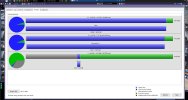
I don't see anything particularly wrong in that screenshot.

Red pie top left ... do you mean the button for opening Blue Iris Status?

1773077622977.png

I believe the red color just means you have unviewed errors in the Log tab of Blue Iris Status.

Are you still missing clips?
Are they missing in Blue Iris's local console (the Blue Iris program window) or in UI3 (the web interface) or both?
Are the clip files missing in the folders on disk where they should be saved?
 
  • Like
Reactions: looney2ns
Yeah the status button is what i was referring to.

Yes the clips for all cameras are missing from last friday. Both UI3 and Main Blue Iris on local console.

I'll look for the clips in the folder....
 
Verified clips are missing in the folder as well. It's like it stops recording cause live view will still work. It's just not saving clips. Restarted PC not it's recording clips again.
 
Verified clips are missing in the folder as well. It's like it stops recording cause live view will still work. It's just not saving clips. Restarted PC not it's recording clips again.
Have you verified that the service is running, worth a check! Any errors in the BI log?
 
If any part of Blue Iris works, the service is running. (unless you don't run Blue Iris in service mode... in which case you should start for reliability's sake).

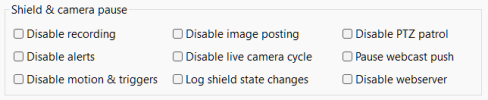
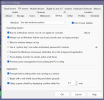
It is possible that recording wasn't working because of the Shield being set accidentally to Red. It happens sometimes! You can prevent this issue by going to Blue Iris Settings > Other tab, and uncheck all the boxes in the Shield & camera pause section.

1773323469152.png

Obviously you would not want to do this if you ever intentionally use the affected functions to disable things temporarily.
 
Have you checked the health of your drives? Might be worth doing because if there are damaged sectors, maybe that might explain why BI can't access all the allocated space. Unsure if BI can detect areas marked as unavailable for writing to in it's disc space anaylsis. I wouldn't know. Just a wild thought.