SmartPSS Lite - annoying red lines?

Sep 5, 2016
36,120
84,316
The Swamp
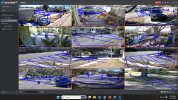
Anyone know how to get rid of these annoying red lines/boxes around the cameras in Live View?

Just upgraded to the newest (Jan '26) version and never had them with my older 2023 version...:idk:


smartpsslite-redlines.jpg
 
Yep got that on the newest Smart PSS Light and previous release. It's seems any camera with IVS or meta data capable, shows the red boundary. I'll investigate.
 
  • Like
Reactions: bigredfish
Yeah, just figured it out a little bit ago.

If IVS rules are enabled/visible, you get the annoying red outline. Turn them off (turn off displaying them that is in SmartPSS) and it goes away
 
  • Like
Reactions: Looksee
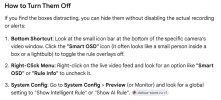
I'd be surprised if #2 didn't work:

smart-pss_red-boxes.jpg
 
  • Like
Reactions: Looksee
Yes indeed, just checked.
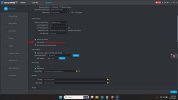
Untick " Show IVS Rule" and red boundaries disappear as well as IVS rules!
I personally use intrusion detection within a defined area. So no problems, with delightful red boundaries.
 
  • Like
Reactions: bigredfish
#3 is what does it for all cameras - Previous versions had the same checkbox/control,
I was well aware of how to disable IVS display. They just didnt have the annoying red outlines in previous versions.
Not sure what they add ? Seems redundant at best.


smartpssliteIVSAND redlinesOFF.jpg
 
A small update:

You can leave IVS rules checked and active in SmartPSS Lite and still get rid of the Red outlines

On each camera view, Uncheck "Detection Box"

IVS rule lines and Target bounding boxes still appear, but the red outlines go away. (still don;t see a need for them)


IVSDetectionboxesSmartPSS.jpg
 
  • Like
Reactions: tigerwillow1
FYI for users of the Mac version from Andy's site like me - 1. and 2. don't doesn't apply but 3. does.

Go to System > Basic Config > Show IVS Rule checkbox (near the bottom of the page)

edit: Above and 2. does. Right click > Smart OSD
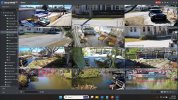
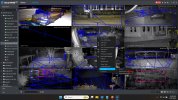
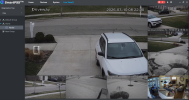
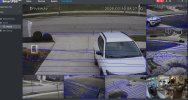
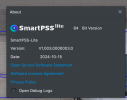
I have a MacBook Air and below firmware from Dahua wiki site. ONLY "Go to System > Basic Config > Show IVS Rule checkbox (near the bottom of the page)" removes my blue boxes from around each camera window all at once. Unfortunately "On each camera view, Uncheck "Detection Box"" does not work for me and I still have blue boxes around each camera view.
Screenshot 2026-03-10 at 8.22.47 AM.pngScreenshot 2026-03-10 at 8.27.26 AM.pngScreenshot 2026-03-10 at 8.31.40 AM.png
 
I have a MacBook Air and below firmware from Dahua wiki site. ONLY "Go to System > Basic Config > Show IVS Rule checkbox (near the bottom of the page)" removes my blue boxes from around each camera window all at once. Unfortunately "On each camera view, Uncheck "Detection Box"" does not work for me and I still have blue boxes around each camera view.
View attachment 239630View attachment 239631View attachment 239632

You need to update to 2026 version