89% CPU 500+GB mem in use

May 1, 2019
2,411
3,840
Reno, NV
This started happening... eh.... December when I was still on 5.9'ish version.
Upgraded to 6.0 versions, problem remains unchanged.
Just now am upgrading to latest/greatest available.

AI channels set to 4 max.
Nothing else much has changed in the last 4 years.
Did add in Blue Iris Tools to do the macro with weather temp & time. That's about it.

Is fine & dandy upon restart. Takes 2-3 days to get maxed out where I have to restart.
I did run only 4-5 cameras instead of my usual 20+. That lasted a week to where I felt comfy to try adding in more cameras. Once added in cameras, problem re-surfaced.

It has been so long since troubleshooting a PC for this or that. What program for PC diagnostics should one leave running on their Blue Iris server for logging?
I do not know if this is RAM, CPU, FAN, or Blue Iris.exe issue.
 
Try adding one camera at a time until you find the trouble camera and then delete that camera and re-add to BI from scratch.
 
Try adding one camera at a time until you find the trouble camera and then delete that camera and re-add to BI from scratch.
delete...re-add. got it.
Is this a thing with v6?
 
I'm in the same boat...Generally run between 15% and 20% CPU but now that I've upgraded to BI6, It'll be cruising along at 15% then all of a sudden it's at 85%. Crazy thing is that there's not even any motion going on when this happens. But, it'll eventually drop back down to 15-20%. The cycle starts over again.

So, a fix may be to delete and re-add cameras one by one?
 
I'm in the same boat...Generally run between 15% and 20% CPU but now that I've upgraded to BI6, It'll be cruising along at 15% then all of a sudden it's at 85%. Crazy thing is that there's not even any motion going on when this happens. But, it'll eventually drop back down to 15-20%. The cycle starts over again.

So, a fix may be to delete and re-add cameras one by one?
I am not sure if recreating any of your cameras will have any effect, but you can try by disabling each camera 1 at a time to see if the problem goes away or disable all of the cameras and see if the problem is gone, then re-enable the cameras 1 at a time to see if a particular camera is responsible. This process should help to pin down if it is camera related and hopefully which one is the culpert!
 
I am not sure if recreating any of your cameras will have any effect, but you can try by disabling each camera 1 at a time to see if the problem goes away or disable all of the cameras and see if the problem is gone, then re-enable the cameras 1 at a time to see if a particular camera is responsible. This process should help to pin down if it is camera related and hopefully which one is the culpert!
Ah, makes sense. Although it seems my problem is intermittent.
 
Be sure to update your exclusion list as well. You can try to just disable the onboard AI if you are using it to see if that is the culprit.
 
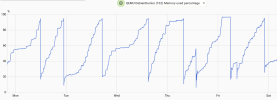
I notice my CodeProject.ai in docker in Debian would consume ram until it locks up. BI itself never gave me issue.

So, I have an automation to restart the CodeProject.AI container when the RAM use is more than 95%

1773198676136.png
 
If it takes several days to get to a max, and is using large amounts of memory, it sounds like a memory leak.