Dear,
I have my ISP router connected to both the NVR N98PBK (GH6950833) and my laptop on a local network at 192.168.1.X.
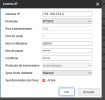
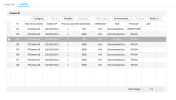
I notice that the internal IPV4 address is configured as 192.168.254.1, so each camera has an address in 192.168.254.X.
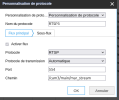
How can I retrieve the RTSP stream via my laptop, as I cannot modify both the local network of the cameras to assign it the same range as the range provided by my ISP BOX.
When i plug my computer on 1 port of 8 ports, i can access RTSP stream Camera 3 with 192.168.254.X on the link.
Thank you.
I have my ISP router connected to both the NVR N98PBK (GH6950833) and my laptop on a local network at 192.168.1.X.
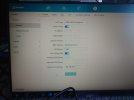
I notice that the internal IPV4 address is configured as 192.168.254.1, so each camera has an address in 192.168.254.X.
How can I retrieve the RTSP stream via my laptop, as I cannot modify both the local network of the cameras to assign it the same range as the range provided by my ISP BOX.
When i plug my computer on 1 port of 8 ports, i can access RTSP stream Camera 3 with 192.168.254.X on the link.
Thank you.