Blue Iris UI3

@bp2008 Does UI3 have the ability to "Crop playback to selection" like in BI, so the alert playback scrub bar represents only the alert duration rather than the full clip length? I'd like more accuracy when scrubbing an alert and my 1-hour clips make the alert scrub area pretty small within a 1-hour clip. Thanks!
 
@bp2008 Does UI3 have the ability to "Crop playback to selection" like in BI, so the alert playback scrub bar represents only the alert duration rather than the full clip length? I'd like more accuracy when scrubbing an alert and my 1-hour clips make the alert scrub area pretty small within a 1-hour clip. Thanks!

Nope, although believe me I have thought about it, I have not implemented that because frankly people had not been asking for it and it is not super easy to do properly.

UI3 does not seem to work since latest update (6.0.3.1) it worked fine before that. Anyone else having issues? I just get ERR_EMPTY_RESPONSE.

You are getting hit by the new "security" features Ken added in 6.0.3.0. Really it is not very fair to call them security features, it is more like bot/crawler mitigation features.

Which web browser are you using? It could be sending a User-Agent header that Blue Iris did not anticipate.

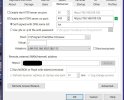
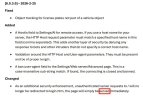
If there is anything in the "Host/s" field in your Blue Iris Settings > Webserver tab, that may also be limiting which requests Blue Iris is able to respond to. I think it should be empty by default. (the change log mentions this but erroneously says it is in Settings/AI).

 
@bp2008 Does UI3 have the ability to "Crop playback to selection" like in BI, so the alert playback scrub bar represents only the alert duration rather than the full clip length? I'd like more accuracy when scrubbing an alert and my 1-hour clips make the alert scrub area pretty small within a 1-hour clip. Thanks!

There is also a seeking mechanism I have seen on a (few) video players in the past where the further you drag your mouse pointer (or finger) from the seek bar while dragging, the slower the seeking gets. Like if you click the seek handle and drag up a few inches before moving left or right, the seek bar will effectively zoom in so you can move left or right more precisely. I kind of want to implement that in UI3 but the sheer complexity of implementing that smoothly and intuitively kind of scares me off. It'd be simpler to just "Crop playback to selection" like Blue Iris is doing.
 
  • Like
Reactions: aesterling
You are getting hit by the new "security" features Ken added in 6.0.3.0. Really it is not very fair to call them security features, it is more like bot/crawler mitigation features.

Which web browser are you using? It could be sending a User-Agent header that Blue Iris did not anticipate.

If there is anything in the "Host/s" field in your Blue Iris Settings > Webserver tab, that may also be limiting which requests Blue Iris is able to respond to. I think it should be empty by default. (the change log mentions this but erroneously says it is in Settings/AI).
I don't think that I am using anything that isn't used by other people. I access it via latest version Chrome, using Tailscale. I do not access it by IP but by custom hostname I set in tailscale, it is also configured to use a self-signed SSL however it doesn't seem to be the cause, as the issue was present even when I switched it to port 80/http. Only thing out of the ordinary setup in this case seems to be Tailscale / custom hostname/domain in Tailscale, however I presume this is possibly used by many people?

bli.jpg

P.S. OK, I didn't see that changelog previously. It is possibly that indeed, as it is a new field and I had not populated it, as I did not expect it. I will upgrade again tomorrow and check settings -> AI to set my custom hostname that I use to connect.
 
Nope, although believe me I have thought about it, I have not implemented that because frankly people had not been asking for it and it is not super easy to do properly.


You are getting hit by the new "security" features Ken added in 6.0.3.0. Really it is not very fair to call them security features, it is more like bot/crawler mitigation features.

Which web browser are you using? It could be sending a User-Agent header that Blue Iris did not anticipate.

If there is anything in the "Host/s" field in your Blue Iris Settings > Webserver tab, that may also be limiting which requests Blue Iris is able to respond to. I think it should be empty by default. (the change log mentions this but erroneously says it is in Settings/AI).
Brian, does the word "served" here seem right to you or does "severed" make more sense?


served-or-severed.jpg
 
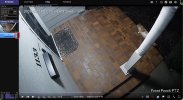
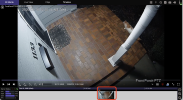
@bp2008 I am on UI3 version 316, Blue Iris version: 6.0.2.8. Minor UI bug: in Clips tab, for wildlife alert, the wildlife icon is displayed, but in Timeline tab, same event, the person icon is displayed - i.e. bug. See 2 screenshots for example. This bug has been around for awhile.clips.pngtimeline.png
 
Brian, does the word "served" here seem right to you or does "severed" make more sense?
"served" is definitely right. The web server is serving the login page from the / path too now. I don't understand how this is a benefit to cybersecurity though.
 
@bp2008 I am on UI3 version 316, Blue Iris version: 6.0.2.8. Minor UI bug: in Clips tab, for wildlife alert, the wildlife icon is displayed, but in Timeline tab, same event, the person icon is displayed - i.e. bug. See 2 screenshots for example. This bug has been around for awhile.View attachment 238818View attachment 238820

UI3 code looks correct for this. I think Blue Iris is fumbling the wildlife flag in timeline data. I can't even assign the wildlife flag to an alert using the JSON API; it corrupts the alert and makes that alert stop working in UI3. I'll submit a bug report.
 
  • Love
Reactions: actran
"served" is definitely right. The web server is serving the login page from the / path too now. I don't understand how this is a benefit to cybersecurity though.
Still doesn't make sense to me somehow since it says ".....unauthenticated server requests will no longer be redirected to login.htm....."

But then again, I've still got a trace of "chemo brain" from last year. :cool:
 
I still can't get this to work via Tailscale. Tried multiple settings, changing default adapter in the Webserver settings, adding host, removing host, everything,.. it just keeps getting "ERR_EMPTY_RESPONSE". I can access it on the local network (via the BI HOST PC->Web browser) however I cannot access it remotely via Tailscale...
 
I can report that with the latest version 3.2 I cannot "serve" the website to browser clients. My config is as follows:

pointing to an internal network NGINX proxy that is reverse proxying to the BI Server. working perfectly on 2.10

the requests coming from the NGIX proxy are banned for a malformed header. I've removed all the parameters from the ban list in the BI settings.

The browser receive a 502 error from the NGINX proxy (10.0.0.51)

this is the log:

2/27/2026 10:41:17.714 AM Server Banning [::ffff:10.0.0.51]: malformed User-Agent header: user-agent: Mozilla/5.0 (X11; Linux aarch64) AppleWebKit/537.36 (KHTML
 
I still can't get this to work via Tailscale. Tried multiple settings, changing default adapter in the Webserver settings, adding host, removing host, everything,.. it just keeps getting "ERR_EMPTY_RESPONSE". I can access it on the local network (via the BI HOST PC->Web browser) however I cannot access it remotely via Tailscale...
Insure a recent Windows Update did not change your server's NIC network properties from"private" to "public".

Although this thread is about UI3 and not Tailscale, I can offer this recent advice from @bp2008 :

 
  • Like
Reactions: gwminor48
Insure a recent Windows Update did not change your server's NIC network properties from"private" to "public".

Although this thread is about UI3 and not Tailscale, I can offer this recent advice from @bp2008 :


I have not updated windows recently... I also do not bind exclusively. The problem is with the new BI update. It works fine with the older version before the "security features" were implemented.
 
I was using it on PC, did not test android/iOS. Anyway, it works now. I guess they "fixed" something as it didn't work up until 6.0.3.3 (ever since they introduced this "security" update) and now with 6.0.3.4 it works. I think for some reason it was directly restricting my IP as someone in this topic mentioned as well, as after the update the Tailscale IP of my PC was appearing in the "Limit access by IP" list each time I try to access via Tailscale. Now it works without changing any settings.