
Please send your details (DAT files and JPEGSs), as well as your description of the problem, along to support (Ken). The more examples he has, the more likely he can sort it out.While digging into this, I've noticed a couple of clear issues.
First, most of the time, the asterisk is on T=0 which I understand is the trigger. I remember we used to say to keep the program checking, you put something impossible in the To cancel text box. I do that. DoNotCancel.
But I only see the asterisk on an image later than T=0 occasionally. So it seems to me that the program decides at Trigger that the capture is static, so it just stops checking.
I have captures that at T=0 it finds two objects that are static, but later images show the moving object with high confidence and marks all of them as static.
Second, if there is a moving object that is under the desired confidence, it will identify the higher confidence object. (My car in my driveway, typically)
Again, I do see some that fix on later images, but not frequently.
I wonder if there is an issue with the code under the Motion Required list box.
Blue Iris Version 6.0.1.24 Now Supports Custom Models
- Thread starter MikeLud1
- Start date
You are using an out of date browser. It may not display this or other websites correctly.
You should upgrade or use an alternative browser.
You should upgrade or use an alternative browser.
Was done this morning.Please send your details (DAT files and JPEGSs), as well as your description of the problem, along to support (Ken). The more examples he has, the more likely he can sort it out.


Bruce_H
Getting comfortable
Running 6.0.2.2 - I have two cameras that have similar views, one of them has frequent Cancelled alerts that say "Occupied" while the other camera does not have any "Occupied" Cancelled alerts, I am going to examine the setting to see if I can determine what is different, I will post back when I get some time to do the compare!

No, I run Frigate in a docker container on a separate computer. If you want to use HA to trigger and capture clips you need have Frigate running somewhere on your network and add the frigate integration into HA.Is that the Frigate implementation within Home Assistant?
Got it. I might try that again.No, I run Frigate in a docker container on a separate computer. If you want to use HA to trigger and capture clips you need have Frigate running somewhere on your network and add the frigate integration into HA.
It looks like the latest release (6.0.2.3) may have resolved the occupied canceled alert issue.
killerdan56
Getting the hang of it
SO WHAT DOES
Support for a “.names” file for any “.onnx” file. Models with 80 classes (COCO) willstill all use the coco.names file.
mean in regards to custom models?
Support for a “.names” file for any “.onnx” file. Models with 80 classes (COCO) willstill all use the coco.names file.
mean in regards to custom models?
Seems like 6.0.2.3 may have only been released for a few hours, 6.0.2.4 was the only available "new" release yesterday afternoon for me. In any case, I am now seeing essentially the opposite problem: static (parked) vehicles being identified as moving; although it might be partially due to today's rainy conditions and reflections off of paved surfaces, TBD in dry conditions.It looks like the latest release (6.0.2.3) may have resolved the occupied canceled alert issue.

CrazyAsYou
Getting comfortable
I've got the same issue (parked car) identified as moving if something else triggers motion in the scene - whatever Ken has done recently with static object he seems to be making it worst not better, I've never had issues in the past unless there was a significant scene factor such as heavy rain, snow or Christmas lights etcSeems like 6.0.2.3 may have only been released for a few hours, 6.0.2.4 was the only available "new" release yesterday afternoon for me. In any case, I am now seeing essentially the opposite problem: static (parked) vehicles being identified as moving; although it might be partially due to today's rainy conditions and reflections off of paved surfaces, TBD in dry conditions.
CrazyAsYou
Getting comfortable
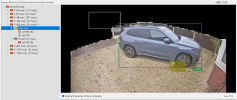
I'd suggest sending this info (JPEG And .DAT file) to support (Ken) at BI. He needs samples to show that whatever he changed about 2 minor releases back has flipped the situation around for the worse.Can anyone explain this to me;
1, In the black masked out area is a road. Why is a car passing on the road in a masked out area getting detected by AI?
2, My car is clearly getting picked up as a static object but when the cat triggered motion BI flagged the car.
View attachment 238418
I might be wrong, but I believe that that is a privacy mask. In my experience, to keep from having cars in the street triggering the camera, use zones. Create zone A that contains the entire camera frame. Then unselect the areas that you do not want motion to trigger. I do this with my driveway. Otherwise, I was getting triggers any time a car went by. Or, you can use a zone to control what object motion is sent to AI. Check out zones in the help file.Can anyone explain this to me;
1, In the black masked out area is a road. Why is a car passing on the road in a masked out area getting detected by AI?
2, My car is clearly getting picked up as a static object but when the cat triggered motion BI flagged the car.
View attachment 238418
Last edited:
CrazyAsYou
Getting comfortable
It's not a privacy mask, it's the area that falls outside of Zone A (not in a zone and should not be considered for motion or AI) I've had this config for years.I might be wrong, but I believe that that is a privacy mask. In my experience, to keep from having cars in the street triggering the camera, use zones. Create zone A that contains the entire camera frame. Then unselect the areas that you do not want motion to trigger. I do this with my driveway. Otherwise, I was getting triggers any time a car went by. Or, you can use a zone to control what object motion is sent to AI. Check out zones in the help file.
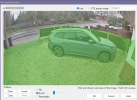
tinker3433
BIT Beta Team
- May 3, 2014
- 30
- 10
I believe that if motion is detected in Zone A (the cat in this case) it will analyze the entire camera view. The masking only applies to motion detection, not what AI analyzes.It's not a privacy mask, it's the area that falls outside of Zone A (not in a zone and should not be considered for motion or AI) I've had this config for years. View attachment 238472
As far as the static object it sounds like Ken is still trying to sort that out.
I do the same thing.I believe that if motion is detected in Zone A (the cat in this case) it will analyze the entire camera view. The masking only applies to motion detection, not what AI analyzes.
As far as the static object it sounds like Ken is still trying to sort that out.
But I don't see any of the camera view blacked out.
It might send the whole image to AI to be processed, but I never see that since I limit the alerts to the desired zone. So it might be doing that, but I'm not aware of it.
All I know is I never see an alert from cars going by on the street, which is what I wanted.

So far mine has been working really well. I have had ONLY 2 occupied alerts, and it was on a camera that I forgot and still had periodic scanning enabled. All my other cams I have the periodic unchecked and they have been great. I think it's getting closer, but even CPAI wasn't perfect, so I'm happy. 6.0.2.6
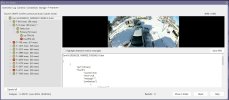
Looking at it now, I see a few occupied alerts. Not a lot though.Since installing 6.0.2.6, I have had Periodic Scanning enabled, and I have not seen any Occupied alerts. I have only seen "Nothing Found", like before.
I have also changed over to the built in AI, and have been so impressed that I uninstalled CPAI.
I'm also going to try turning off periodic scanning and see what happens.