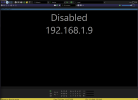
BI suddenly showing "Disabled"

spybaz

n3wb
Jun 16, 2025
15
4
Seattle, WA, USA
My BI is suddenly showing "Disabled" and it happened right while I was looking at a perfeectly fine live feed. I even ran the 'Find/inspect" and it ran fine too. Also, the camera is working fine in it's own web interface and the IP addresses match. I rebooted the camera also.

See attached.

Any ideas?

Thanks!
 

Attachments

  • BI Disabled.png
    BI Disabled.png
    64.4 KB · Views: 4
Yup on the General tab of the camera settings, there is a checkbox "Enabled" and also when you right click a camera, near the top of the context menu is an "Enable" or "Disable" button.
 
I don't remember ever clicking that check mark but maybe!

You'd be surprised how many come here with an issue that turned out to be an inadvertent mouse click lol.

Heck I lost a camera not too long ago as a result of an inadvertent click lol
 
Last edited:
  • Like
Reactions: anijet and bp2008
Yeah, remember when the all cameras pause button did not require a long press? Hell even after it started requiring a long press sometimes people hit it by accident. I wonder if there was a hotkey for it too.

And back in the day you could drag a camera into a desktop frame that disappears behind the normal BI window without realizing you did anything.

Ah the good old days.
 
  • Like
Reactions: Broachoski