Looking for 10x optical zoom as cheap as possible

bp2008

Staff member
Mar 10, 2014
13,378
15,381
USA
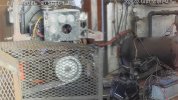
I'm looking for as cheap as possible of camera to watch a small panel of analog gauges on industrial equipment, indoors. It needs to meet these criteria:

  • Able to zoom to 20 degree horizontal FOV or narrower. More zoom is very welcome.
  • RTSP video streaming
  • 1080p or higher resolution (unless made up for my longer zoom)
  • 12v or PoE powered
  • Functional exposure control

Bonus:
  • Wired ethernet
  • PoE
  • LEDs (IR or visible) for illumination of target at night
  • WDR (helps read gauges in changing light conditions)
  • Built-in microphone

Deal-breakers:
* Cloud-connected crap, forced mobile app, etc.

Doesn't matter:
  • Sensor size / light sensitivity
  • PTZ
  • Powered zoom
  • Onboard analytics / AI

Looking for price under $100 USD.

Been using an old Dahua 2MP starlight varifocal for this in the past but the zoom is a little insufficient. Gauges are often dirty with some glare making them not quite readable with confidence.

Empiretech "Z4E" cameras could do it but it is very much overkill and overpriced for this job.

I see Revotech has one with a modest optical zoom range that would probably outperform the current camera here, but the actual FOV is a bit of an unknown factor.
 
As an Amazon Associate IPCamTalk earns from qualifying purchases.
I have one of those particular Revotech cameras that I have yet to place in service but use several of their other fisheye and pinhole varieties. This one does not have IR and has manual zoom and focus which is not a problem,
If you tell me the distance from camera to gauges, I will set it up and show photos at max zoom and field of coverage.
 
The Revotech did not perform well for me. did not get good focus at 10-12 feet under artificial lighting.
Their stated 22mm zoom is lacking also. Did not zoom much over an old Dahua 2.7-12mm that I compared it to.
 
Great to know, thanks. That one would have been a waste of time then.
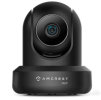
You can probably get away with using a cheap $60 Indoor Amcrest PTZ Camera (powered via PoE). I used one for several months for reporting my metered (vintage dial gauges) electricity usage to the utility company. Worked out well until we were suckered to go with "smart" meters.

1771158446604.png
 
  • Like
Reactions: Broachoski
You can probably get away with using a cheap $60 Indoor Amcrest PTZ Camera (powered via PoE). I used one for several months for reporting my metered (vintage dial gauges) electricity usage to the utility company. Worked out well until we were suckered to go with "smart" meters.

View attachment 238231
These are cool cameras. I have 3 of them. But they do not have optical zoom, and at only 4mp, 10 feet will likely be too far for the digital zoom to read a small gauge like that.
 
  • Like
Reactions: Arjun
Can you explain what you are trying to observe?
Are you trying to read the small round dials or you want to have an overview of the entire nuclear reactor?
Just trying to read the dials with confidence in all lighting conditions.

I'm not sure if the little one by itself to the far right is relevant.

This one looks possibly promising at $80 from Annke directly. Sounds like the Blue Iris integration sucks balls but it should at least be able to load the video stream which is the most important thing.
 
We used to have one of the old first-generation Ubiquiti Aircam in there because it was trivially easy to remove the front cover, unscrew the lens, and swap the lens with any focal length you wanted, even with IR support (which that camera didn't natively have). I forget what format of lens it was, but the lenses were dirt cheap on ebay. Of course within a matter of months the lens went out of focus and the guy maintaining the machine didn't know how to fix it, and then the camera died anyway due to the fairly extreme summertime heat, vibration, dirt, etc in that place. We haven't had this clear of a view in 11 years, and this view even kind of sucks still.

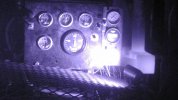
Gauges 20140820093533.jpgGauges 20140820220534.jpg
 
These are cool cameras. I have 3 of them. But they do not have optical zoom, and at only 4mp, 10 feet will likely be too far for the digital zoom to read a small gauge like that.
Interesting, because anytime I zoom in, it does not feel like I am digitally zooming in. Seems to mimic optical zoom - pretty cool that it can maintain clarity when digitally zoomed in. Its my oldest set of indoor cameras in my fleet, lol
 
  • Like
Reactions: Broachoski
Real on-camera digital zoom is better than if it is only implemented in the video player alone. I wonder if that is what the Amcrest are doing.

When digital zoom is done within the camera before video compression, you avoid basically all loss of detail from compression artifacts.
 
  • Like
Reactions: Arjun
Real on-camera digital zoom is better than if it is only implemented in the video player alone. I wonder if that is what the Amcrest are doing.

When digital zoom is done within the camera before video compression, you avoid basically all loss of detail from compression artifacts.
That makes sense
 
  • Like
Reactions: bp2008

These come up from time to time for around $30. I couldnt find the mic on the PCB, but it might be somewhere on the lens module.
 
  • Like
Reactions: bp2008
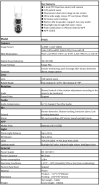
It turns out this one is acceptable: ANNKE WCD1012 10MP Dual-Lens Outdoor Wireless WiFi PTZ Security Camera

It cost just $60 and is a very light-weight plastic PTZ with quite decent optical zoom and a second fixed lens on top.

1771614153184.png

The specs are incomplete, so allow me to add a few key points:

  • RJ45 Ethernet (no PoE)
    It has an RJ45 ethernet jack on the pigtail, which comes with a protective weather-resistant cover like Dahua and Hikvision cameras do. Ethernet works for networking so you don't need to use WiFi, but it does not support PoE.
  • Web Interface
    The camera has a web interface!
    It is very janky, requiring installation of a large third-party software package that is hosted on a Chinese web server. For archival reasons I have uploaded a copy of the plugin/software to this forum here Without the plugin, the web interface will not load at all except to give a download link for the plugin.
    With the plugin, the web interface is similar to that of a Dahua camera, and is fairly feature-rich.
    I ran the plugin only in a Windows Sandbox instance, because I do not trust it.
  • ONVIF
    It supports ONVIF, but ONVIF is not enabled by default. It can be enabled in the camera's web interface. It is controlled by a checkbox among the Network configuration options, and uses port 8899 by default for ONVIF (not port 8999 which Blue Iris expects by default).
    Once ONVIF was enabled, you can enter the IP address, credentials, and the ONVIF port number into Blue Iris and use Find/inspect to discover the rest of the configuration. Main and sub streams work, with audio, and so does PTZ (including setting and loading presets).
  • RTSP
    It supports RTSP video streaming with audio. At first glance, it appeared to not care what path you use (e.g. rtsp:/192.168.1.4/ is equivalent to rtsp:/192.168.1.4/Anything). But after I enabled ONVIF on the camera, Blue Iris was able to discover main and sub stream URLs:
    Code:
    mainStream:   /channel=0_stream=0&onvif=0.sdp?real_stream
    subStream:    /channel=0_stream=1&onvif=0.sdp?real_stream
    It includes the video from both lenses in one stream, with the fixed lens rendered above the PTZ lens. I could not find a way to pull video for each lens separately, and there were no encoder options to support such a configuration so I doubt it is possible with this camera.
  • Mobile App
    The iCSee mobile app may be necessary for some setup. It was able to discover the camera on my network and adopt it without credentials. Using the app it was possible to discover/change the login credentials for the camera, but it was buggy. My initial attempts to log in were unsuccessful using a 10-character password with capital and lower-case letters and a number. After shortening the user name to 4 lower case characters and simplifying the password to 8 characters with only lower case letters and a number, I was able to log in.
DHCP is enabled by default, so there is evidently no "default IP address" for this camera.

I'm almost certain it reaches out to the cloud by default, and it is being installed at a location where I do not have the ability to block this, so I did not bother trying to see if I could block it and have the camera still work.

I used the ICSee mobile app before I tried installing the plugin to use the camera's integrated web server, so I do not know if I would have had a first-time setup wizard if I had skipped using the app and gone directly to the integrated web server.

More details including a few snapshots to come later.
 
Last edited:
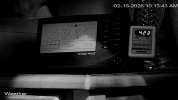
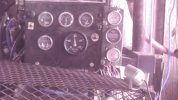
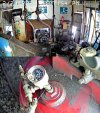
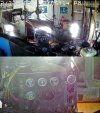
Here are some snapshots.

After just a few days, there is condensation behind the lenses. This is mounted indoors and subject to constant vibration so it should be interesting to see how long it lasts.

It supports PTZ presets, but is not super precise in loading presets (the positioning is not very consistent) and it does not properly autofocus after loading a preset, so you must nudge one of the ptz motors after loading a preset in order to make it focus properly. Manual focus controls appear to be inoperable via ONVIF through Blue Iris.

2026-02-20 03.07.53.907 PM.jpg

2026-02-22 12.05.10.240 PM.jpg

It does have audio, but the audio is not configurable, and the built-in noise cancellation causes the volume to change frequently as it seems to be very confused by the continuous noise in this little shack.
 
Here are some snapshots.

After just a few days, there is condensation behind the lenses. This is mounted indoors and subject to constant vibration so it should be interesting to see how long it lasts.

It supports PTZ presets, but is not super precise in loading presets (the positioning is not very consistent) and it does not properly autofocus after loading a preset, so you must nudge one of the ptz motors after loading a preset in order to make it focus properly. Manual focus controls appear to be inoperable via ONVIF through Blue Iris.

View attachment 238600

View attachment 238602

It does have audio, but the audio is not configurable, and the built-in noise cancellation causes the volume to change frequently as it seems to be very confused by the continuous noise in this little shack.
For $60, I can't complain lol