Hello Community,
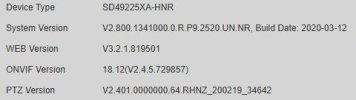
I'm experiencing the following problem with my Dahua DH-SD49225XA-HNR-S3 PTZ camera, software version: V2.812.0000018.0.R Build: 2024-11-13
Problem description:
The PTZ camera sporadically changes its position on its own, without any user intervention or control input. The camera moves to a significantly different position and remains there. This may be a factory setting or a default position.
However, the previously saved preset positions remain correctly stored. After a restart, the camera returns to the originally desired position. However, the problem recurs after a few minutes or hours.
So far, I've taken the following steps:
I suspected PoE power supply issues as the cause.
• The original PoE power supply was located in a distribution box.
• The cable length to the camera is approximately 15–20 meters.
• A new PoE power supply was installed near the camera for testing purposes.
Unfortunately, this measure did not resolve the issue.
I cannot currently test an external power supply (Vcc +12V).
However, this is difficult to implement at the moment, as the camera is mounted on a large wall bracket (D-PFB303S) in a mountainous area. Accessing the Vcc connector would require disassembling the camera. Due to the current freezing temperatures, this is not possible.
Observations when the problem occurs:
1. The problem occurs sporadically – regardless of the time of day, whether it's operating at night, or the lighting conditions.
2. No user is accessing the camera via the app or NVR at the time the problem occurs.
3. The camera exhibits behavior similar to initialization (comparable to the process after a restart), but does not perform a full restart. The NVR does not report any video loss. No message such as "PTZ restart" or similar appears on the monitor.
2. The camera does not perform a full restart. 4. It's also noticeable that numerous Dahua cameras – including older models – received a firmware update at the end of 2025, but this camera did not.
5. The camera worked flawlessly for a year.
I would be very grateful for a solution.
I'm experiencing the following problem with my Dahua DH-SD49225XA-HNR-S3 PTZ camera, software version: V2.812.0000018.0.R Build: 2024-11-13
Problem description:
The PTZ camera sporadically changes its position on its own, without any user intervention or control input. The camera moves to a significantly different position and remains there. This may be a factory setting or a default position.
However, the previously saved preset positions remain correctly stored. After a restart, the camera returns to the originally desired position. However, the problem recurs after a few minutes or hours.
So far, I've taken the following steps:
I suspected PoE power supply issues as the cause.
• The original PoE power supply was located in a distribution box.
• The cable length to the camera is approximately 15–20 meters.
• A new PoE power supply was installed near the camera for testing purposes.
Unfortunately, this measure did not resolve the issue.
I cannot currently test an external power supply (Vcc +12V).
However, this is difficult to implement at the moment, as the camera is mounted on a large wall bracket (D-PFB303S) in a mountainous area. Accessing the Vcc connector would require disassembling the camera. Due to the current freezing temperatures, this is not possible.
Observations when the problem occurs:
1. The problem occurs sporadically – regardless of the time of day, whether it's operating at night, or the lighting conditions.
2. No user is accessing the camera via the app or NVR at the time the problem occurs.
3. The camera exhibits behavior similar to initialization (comparable to the process after a restart), but does not perform a full restart. The NVR does not report any video loss. No message such as "PTZ restart" or similar appears on the monitor.
2. The camera does not perform a full restart. 4. It's also noticeable that numerous Dahua cameras – including older models – received a firmware update at the end of 2025, but this camera did not.
5. The camera worked flawlessly for a year.
I would be very grateful for a solution.