AI advice after v6 upgrade

hspindel

n3wb
Aug 31, 2025
10
0
USA
Just upgraded to v6. Went very smoothly - thank you Blue Iris.

On the master settings page for AI, I changed the provider from local service on port 32168 to Built-in models. Is that all I need to change to enable the new AI? The button for "Open AI Dashboard" doesn't do anything anymore.

With the old AI, I could open a browser window that showed me what the AI server was doing. Is there a way to do that with the built-in AI? T
 
The button for "Open AI Dashboard" only works with the external CPAI, there is no web page for the built in AI console! To see what it does on an alert, enable you should be able to <CTRL> double link on any of the alerts that come from AI on the left side of the BI console!
 
Thank you, Bruce H. I tried control-double-click on one of the left-side It opened a window showing a video clip. That's not what I'm looking for. I want to see (in a text statement) what the AI is determining is present in the video.
 
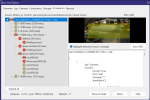
When you <Ctrl> double click this what you should see for an alert that was generated using the Internal AI, perhaps you don't have the generate DAT files turned on! Look at the Camera settings on the AI tab, and click on the configure button, make sure that you have the box checked for the "Save AI analysis .DAT files"
1770944253493.png
 
Yes, the modules are installed. AI Status on camera settings says AI is online. If I click on the Download Models link on BI settings, it says the models are already installed.

I can't see how to get to the status page for which you posted the image. Control-double click brings up a window with a video clip, not the status page.

Update: Think I figured it out. The status page does not come up if AI cancels the alert. Once I saw an alert that passed the AI filter (it was a person), then I could bring up the status page. Was expecting that any video that was passed through AI would bring up a status page that told me "nothing found".

Thank you for your help.
 
Yes, the modules are installed. AI Status on camera settings says AI is online. If I click on the Download Models link on BI settings, it says the models are already installed.

I can't see how to get to the status page for which you posted the image. Control-double click brings up a window with a video clip, not the status page.

Update: Think I figured it out. The status page does not come up if AI cancels the alert. Once I saw an alert that passed the AI filter (it was a person), then I could bring up the status page. Was expecting that any video that was passed through AI would bring up a status page that told me "nothing found".

Thank you for your help.
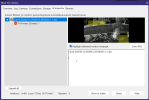
That is strange, when I <CTRL> double click on one of my canceled alerts that says nothing found I get this!
1770979491111.png
 
When you <Ctrl> double click this what you should see for an alert that was generated using the Internal AI, perhaps you don't have the generate DAT files turned on! Look at the Camera settings on the AI tab, and click on the configure button, make sure that you have the box checked for the "Save AI analysis .DAT files"
Even if you don't enable the "Save AI analysis .DAT files", Blue Iris automatically saves a DAT file, but for the most recent alert only.

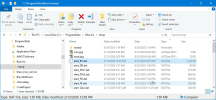
Unlike the DAT files that are stored in the Alerts folder, this auto-saved DAT file is stored in folder "C:\ProgramData\Blue Iris\temp". Each new alert overwrites the previously save DAT file.

1771087689937.png

Ken recently fixed Blue Iris so that this auto-saved DAT file is displayed (if a DAT file does NOT exist in the Alerts folder) when you double-click the most recent Alert image in the alerts list.
 
Last edited:
  • Like
Reactions: looney2ns