T54PRO-ZE vs IPC-Color4M-TZ

I updated to the latest firmware (with AI-ISP disabled) and I got the same issue: as soon as the "Warm Light" is activated, everything goes to black after half a second (like if the camera was trying to under expose).
Anyone has any idea of what is happening ?
 
Ok I found the bug.
I noticed that the warm light is bright for around 0.5 seconds then it is switching to a much lower brightness (which is probably why the picture goes black as the exposure is set to the former brightness).
It is happening when I am changing the IVS rule, for instance for a different planning.
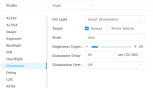
However if after changing the IVS rule, I visit (visit only, not changing anything) the Camera/Image/Illuminator settings (in my case for the night settings) and wait for the preview picture to appear, then the bug goes away.
Not sure if it goes away permanently, I'll have to check.
But at least I can confirm that this is a bug.

EDIT: unfortunately the "fix" did not survive the night. In fact it doesn't survive after 5-10 minutes. I reset all settings to default to see if the bug goes away, we'll see tonight.
 
Last edited:
  • Like
Reactions: CCTVCam
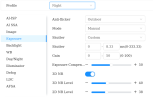
More details about the bug: it is related to the working mode Day/Night.
In the middle of the night, I have half a second of the Night settings and then it is switching to the Day settings.
Which is why the light is going from bright to dim and why the exposure is going to under exposed.

Changing the exposure to "auto" in Day settings give me good exposure now in the Night time.
 
More details about the bug: it is related to the working mode Day/Night.
In the middle of the night, I have half a second of the Night settings and then it is switching to the Day settings.
Which is why the light is going from bright to dim and why the exposure is going to under exposed.

Changing the exposure to "auto" in Day settings give me good exposure now in the Night time.

But what does motion look like with exposure at auto during the night?
 
Ok when I say "good exposure", it means that it is acceptable (not fully black). But I still have work to do to see what is the best combination to work around this bug.
The exposure is flickering between states for one second before settling down on the final exposure.
For just a glimpse, I have a very nice and bright exposure before it goes to the final "normal" exposure.
To avoid the flickering, I suppose I have to avoid the Day/Night working mode.

When the exposure is good, the motion looks good.
 
  • Like
Reactions: CCTVCam
The Pro and 4M need light. If the light there is not good, then you would need to use the built-in white light of the camera, which many people don't want to use. Sure these newer cameras can produce a nice static image at night in color, but clean capture with an object in motion is what we are after.
 
So I raised the issue of Day/Night settings for the IPC-Color4M-T to Andy (camera switching to Day settings just after the warm light is activated).
He said he forwarded it to Dahua.
In the meantime, I am back to Auto settings and it somehow works.

As advised, I compensated the weak warm light by an additional light (triggered my motion detection), but now the problem is that this light is lighting up quite soon, which makes the IPC-Color4M-T to think that it doesn't need to switch on the warm light (it is in Smart illumination mode). As the additional light is a bit farther, it means that people coming directly in front of the camera have the additional light behind them and no front illumination from the camera anymore (so the face is not really recognizable).

I looked in the camera settings, but it doesn't seem possible to force the warm light to light up in case of motion detection during the night ?

This warm light feature is nice but it is creating quite a number of issues...

 
Best way to switch between day and night is via the use of a manual schedule if the day / night switching app written by someone on here doesn't work. However, it takes time (literally years to perfect the perfect switching time and even then, adverse weather can catch it out eg if it goes very dark during a storm during the day setting). Most of us set the cameras to switch to night settings a little early as this avoids the issue of it going dark earlier than expected due to weather and also variations in time within a month eg it can go darker a lot earlier by the end of an Autumn month than at the start.

It's a shame a newer version of the App has never been able to be written that works with the newer interface.
 
So I raised the issue of Day/Night settings for the IPC-Color4M-T to Andy (camera switching to Day settings just after the warm light is activated).
He said he forwarded it to Dahua.
In the meantime, I am back to Auto settings and it somehow works.

As advised, I compensated the weak warm light by an additional light (triggered my motion detection), but now the problem is that this light is lighting up quite soon, which makes the IPC-Color4M-T to think that it doesn't need to switch on the warm light (it is in Smart illumination mode). As the additional light is a bit farther, it means that people coming directly in front of the camera have the additional light behind them and no front illumination from the camera anymore (so the face is not really recognizable).

I looked in the camera settings, but it doesn't seem possible to force the warm light to light up in case of motion detection during the night ?

This warm light feature is nice but it is creating quite a number of issues...

This is the problem with the current Smart Illum implementation

I want the white LEDs to kick in on IVS activation, regardless of light sensor.

I’ll say again that if they had just added dual lights to the 5442 and enabled them to be activated by IVS or full time instead of trying to be cute with the camera deciding, they would have sold a bazillion of them
 
  • Like
Reactions: CCTVCam and swoozle
I agree in so far as I don't want LED's on all the time. On detection yes. But all the time no as it costs electricty and wears them out quicker. On a separate but related topic I'd rather have a better sensor on a CCTV camera than led's built in to compensate.
 
  • Like
Reactions: Arjun
That’s why I said OR
If they can provide the option for one they can provide the option for the other

The whole “let the camera decide” on lights activating and/or the camera sensor deciding what light is needed is a foolish attempt to make them plug and play and while it may be fine for the masses who don’t really care or know the difference, for those of us who do care, it’s a nuisance.

Two different audiences and unfortunately we’re the minority
 
I have the LEDs come on when IVS detects motion, I force it stay on Black & White mode, configuring the settings this way makes you achieve similar image quality like the proven 5442 model with its IR on based in scheduling.
 
@Arjun How do you have the LEDs come on when IVS detects motion ?
Through the Home Assistant integration (GitHub - rroller/dahua: Dahua Camera and Doorbell Home Assistant Integration), you can control the illumination of some Dahua camera, but unfortunately it is not (yet) compatible with IPC-IPC-Color4M-TZ or Color4M-T. Otherwise I could have activated the LEDs as soon as IVS detection is triggered.
Please do share your settings to achieve similar quality like the 5442 !
Thanks !
 
  • Like
Reactions: Arjun
My bad for leading anyone astray.
Actually on the 4M-T and TZ, the lights are not activated by IVS as can be set on the 54PRO.
On the 4M-T the white LEDs are activated purely by the Smart Illum setting using the entire FOV with a phantom like SMD feature. In other words the camera sees movement (with human/vehicle filter) anywhere in its FOV it activates the white lights. No control other than off or on.
 
@Arjun How do you have the LEDs come on when IVS detects motion ?
Through the Home Assistant integration (GitHub - rroller/dahua: Dahua Camera and Doorbell Home Assistant Integration), you can control the illumination of some Dahua camera, but unfortunately it is not (yet) compatible with IPC-IPC-Color4M-TZ or Color4M-T. Otherwise I could have activated the LEDs as soon as IVS detection is triggered.
Please do share your settings to achieve similar quality like the 5442 !
Thanks !
I should clarify that I have the LEDs coming on in IVS (Tripwire and Intrusion) on 54PRO model - I have not tried this on the 4M-T and TZ yet, however, I am aware that there is a potentially a bug in the 4M-T and TZ models' firmware which makes the Smart Illumination feature behave inconsistently.

I will post settings shortly