Blue Iris Version 6.0.1.24 Now Supports Custom Models

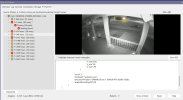
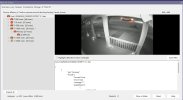
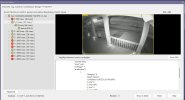
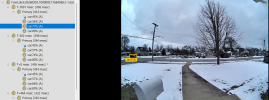
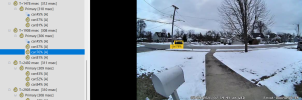
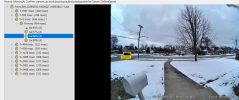
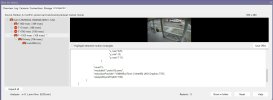
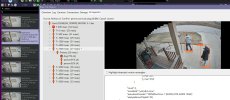
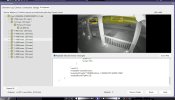
Here are a few examples: The last one worked and all within 10min of each other. So, it appears by the * that it is marking an object "occupied" and then is no longer looking at any later images and why it does not see the car when it comes into the frame. Not sure if that is the correct way it should work or not?
Screenshot 2026-02-03 192850.jpgScreenshot 2026-02-03 193020.jpgScreenshot 2026-02-03 193817.jpgScreenshot 2026-02-03 194135.jpg
 
Last edited:
This morning after going back to just using the yolov8m model and doing a full system restart, my occupied alerts were very few. I still had a couple like the one I posted here:

Screenshot 2026-02-04 065305.jpg

The * image it detected a bench and then it did see the car, but it remained occupied. Bench was still active in my coco.names file, so that is fixed. So much better now and will see how it goes through the daylight hours. Most of my occupied alerts from before were during night time.
 
I didn't say that BI doesn't support custom models, I said that the included models just work better.

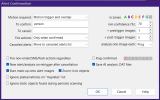
Can you post a screenshot of your alert confirmation and an occupied canceled alert that includes a car?

The screenshots you previously posted all included a truck.
Car (Sedan actually): Car is moving, but identified as occupied.
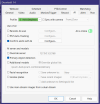
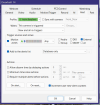
Had alert Trigger Source set as External from CPAI settings. Maybe should be AI?
1770214575456.png
1770214711203.png
1770214794081.png
1770214887581.png
 
I didn't say that BI doesn't support custom models, I said that the included models just work better.

Can you post a screenshot of your alert confirmation and an occupied canceled alert that includes a car?

The screenshots you previously posted all included a truck.
Sorry, what's an alert confirmation?
 
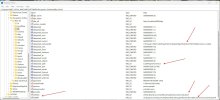
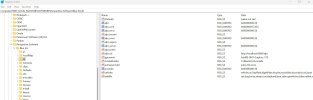
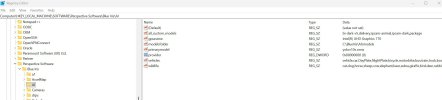
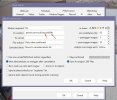
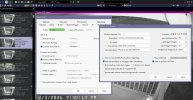
One other thing I noticed while in registry. There seems to be a lot of old references to CPAI and deepstack. I'm going to clean that up, not sure if it will help, but that always has been a issue with BI, it tends to leave a lot of junk in the registry. Also note there it lists wildlife and then all the names it includes. My thought is why would we need to list like dog or cat in our camera's confirmed section. I do list wildlife there also.

Screenshot 2026-02-04 082324.jpg
 
It helps if you highlight the entry that has the "*" beside it, then we know what image it actually used.

It helps if you highlight the entry that has the "*" beside it, then we know what image it actually used.
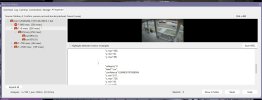
Here you go. Does this help? The one with the asterisk.

My point is the vehicle is moving. It's not a car sitting still in the street. That's all I am asking. I'm curious about the logic that labels the image as occupied. that's all. If I had some insight about the decision that marks the moving image as occupied, I could try to reduce the occurance of these.
1770218105573.png
 
Here you go. Does this help? The one with the asterisk.

My point is the vehicle is moving. It's not a car sitting still in the street. That's all I am asking. I'm curious about the logic that labels the image as occupied. that's all. If I had some insight about the decision that marks the moving image as occupied, I could try to reduce the occurance of these.
View attachment 237571
no, you need to click on and highlight the asterisk line.
 
Ok, here I deleted all the deepstack garbage and a lot of other stuff on my demo. Everything works great lol So my next step is to clean up my main one.

Screenshot 2026-02-04 083729.jpgScreenshot 2026-02-04 094136.jpg

Not one occupied alert as well on demo, but its only been up for a hour so far.

Since I use no alpr I deleted all that as well. Everything runs fine. I assume once I selected some alpr options it would then just populate the registry as needed. Just be sure to export the AI key in case you screw up something.

Screenshot 2026-02-04 100810.jpgScreenshot 2026-02-04 101007.jpg
 
Last edited:
  • Like
Reactions: Vettester
So back to my earlier question, do we need to list wildlife AND dog in the confirm box?

View attachment 237582View attachment 237583View attachment 237584
The "To confirm" field should only contain a list of objects that are supported by the model. In your case, that's "dog", "cat", etc. The model doesn't have an object called "wildlife" so you wouldn't list it.

BI then has three lists it uses to internally mark the clip as containing a vehicle, a person or wildlife. The wildlife list is already populated with objects like "dog", "cat", ...

If you started using a custom model that could detect some new animal like "penguin", you would put "penguin" in your "To confirm" list and you would also add "penguin" to the Wildlife list so the clip gets marked as containing wildlife.

I do this with my delivery model adding in "amazon", "dhl", "fedex", etc. into the vehicles list so the clips get marked with the vehicle icon.
 
Last edited:
  • Like
Reactions: anijet and Tinman