Periodic Scan

sumps

n3wb
Oct 8, 2023
5
0
canada
I had to roll back to 6.0.0.1 ..
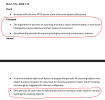
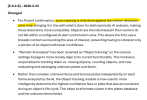
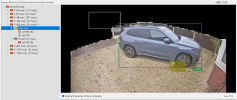
after the change in periodic scan in 6.0.1.13 I had noticed thatI would miss some alerts of vehicles driving by the camera..viewing the clip in the AI inspector it would show that theca's that were parked on the street were correctly identified as static (yellow box), however it would also mark the vehicle moving across the screen as static as well and would not trigger an alert ..This never occurred with the old periodic scan system..I have no idea how to fine tune this to try and figure out why a moving object is seen as static especially since its random and the new periodic scan no longer has any configuration aside from how often it scans (set at default 120 seconds)

Have anyone else experiencing this?
 
I would suggest moving to the latest version (6.0.1.28). .13 is pretty old given the fast pace of bugs being fixed and new features/functionality being added, including some specifically related to the periodic scan function (according to the release notes).
 
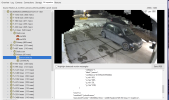
After almost a week back on 6.0.0.1 and having 0 issues with static object detection, I updated to the latest version 6.0.2.0 and only after a few hours the system started detecting moving cars and even people as static objects ... Not sure what is causing this, Periodic AI scanning settings are at their default timings (no real documentation on what the "scan at least" and "but no faster than" settings do) .. something has definitely changed for the worse unfortunately ... attached image shows a person walking that is marked as static (Yellow box) by the primary scan .. very odd behaviour

Screenshot 2026-02-02 at 7.56.03 PM.png
 
I've seen this too, even with periodic AI scanning turned off: my temporary/provisional workaround has been to lengthen the timings between each AI scan. I was originally running either 333ms or 500ms timings, but I am primarily concerned with detection of people and slow moving (in the process of parking) vehicles, so I have changed these to 750ms or 1 second timings now. My theory is that there isn't enough movement in the "bounding box" surrounding these object detections at relatively short/fast timings, and it has helped in my situation. Obviously these timings won't work for faster moving vehicles and/or LPR.

This might be worth sending questions to Ken though if you are consistently having issues in this area.
 
  • Like
Reactions: Skinny1
I agree with your theory.
OK, it's great to hear that someone with significant experience with the AI models agrees, but some questions remain. Why does the BI (built-in) AI respond so differently compared to CodeProject AI in this regard? I essentially never had this issue with CPAI.
 
Yes, I had seen that too. It's a shame it is worse than before, but I suspect you might be better positioned to persuade him of that than the average user, given your experience in this area.
 
Quick update .. Not sure if I've been doing it wrong all along having Periodic AI Scanning enabled, but I've always had it enabled along side Confirm alerts using AI feature .. I was under the impression that it had to be on in order to prevent false triggers from static objects (cars in driveway etc) .. and it's always worked well right up until version 6.0.1.13 when the system was tweaked ... all of a sudden moving objects were being detected as static randomly. a couple days ago I turned off the Periodic AI Scanning function and I have not had any more issues with false static objects .. Perhaps I've jsut been using the Periodic AI function incorrectly all this time and didn't actually need it enabled for my purposes?
 
I tried this version for a few hours yesterday and wound up reverting, as I was getting Pushover alerts for zones that I wouldn't normally. Honestly, it is getting to the point where there are way too many places where we have "zone controls" and it is becoming difficult to follow all the potential interactions and consequences for the final alert status.

On top of that, the paragraph above is written in (Ken's) typical programmer's language: blunt, but with no examples to illustrate the concept. The help file is generally slightly better, but could still be expanded considerably with more example situations.
 
I've had this version installed since this morning and think I'll also have to roll back, I've got a very similar issue in that all motion triggers are then triggering my "Alert" >> "On alert" actions even when AI lists them as "Nothing Found" - I have a number of pushover, MQTT and other alert actions that have all been going bonkers today for nothing more than trees/bushes blowing in the wind, I could overcome this by editing every single one of them to require certain AI objects but given my number of cams and actions per cam it would take me hours to edit them and only workaround for what is now a new bug on the logic of "Confirm alerts with AI" :(
 
  • Like
Reactions: jrbeddow
Happy to hear that a fix has been released, but it still begs the question: what is this for, and what exactly does it change? How can we make use of this new feature?
 
what is this for, and what exactly does it change?
From the way I understand this it eliminates issues like this:


But I'll let @CrazyAsYou verify this.