
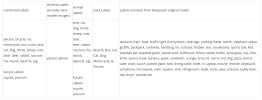
I appreciate the reply. Where can I see a list of labels (objects) for each of these models? I'd like to specifically confirm certain things before I'm alerted. Thanks!Nothing, Mike said he just renamed them.
Blue Iris Version 6.0.1.24 Now Supports Custom Models
- Thread starter MikeLud1
- Start date
You are using an out of date browser. It may not display this or other websites correctly.
You should upgrade or use an alternative browser.
You should upgrade or use an alternative browser.

I have had this for some time, not sure if it's still current:I appreciate the reply. Where can I see a list of labels (objects) for each of these models? I'd like to specifically confirm certain things before I'm alerted. Thanks!


If you want to confirm the labels of a model you can use this tool. Click on images twice and on the right side will show you the labels for the model, the below is the general modelI appreciate the reply. Where can I see a list of labels (objects) for each of these models? I'd like to specifically confirm certain things before I'm alerted. Thanks!

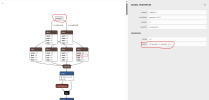
It looks currentI have had this for some time, not sure if it's still current:
Wow, very nice !If you want to confirm the labels of a model you can use this tool. Click on images twice and on the right side will show you the labels for the model, the below is the general model
View attachment 237156
killerdan56
Getting the hang of it
someone test the new PACKAGE detection model and post about it. Is it better for a doorbell camera or ok with a normal 6ft+ ip camera?
Wasn't aware of that, thanks - I will give it a go.Just dl them here then:

Little up to understand how its working.Can you explain how primary and additional models works ?
Images are sent to every models at the same time ?
The detection is slow ?
For you what is the best combination to detect person day and night ?
I only used yolo11x until recent BI versions.
Thanks.

I'd like help with this as well. If I only want to test AI using the bi-animal, bi-combined, bi-dark, bi-general and delivery models, how do I use them and turn offthe built-in yolov8s? Thanks!Little up to understand how its working.
First go to blueiris settings/AI and select which additional models you want.I'd like help with this as well. If I only want to test AI using the bi-animal, bi-combined, bi-dark, bi-general and delivery models, how do I use them and turn offthe built-in yolov8s? Thanks!
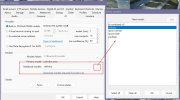
Then go to each camera and select the additional models:
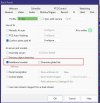
If you just want certain models out of your additional group of models check the box and specify which ones in the box.
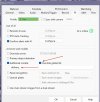
You must use the built-in YOLOv8 but you can select what models you want to use.
I believe that you can use just Onvif as the trigger source, then the AI will confirm the alert to that trigger.for most cams I use IVS and Onvif as the trigger source in BI. If I want to use the AI models to confirm, will it do that with just Onvif selected or do I have to add (or replace) with BI's "Enable Motion Sensor "as trigger?
Thanks for the reply and screenshots. Does unchecking "Primary Object Detection" keep it from using the YOLOv8?First go to blueiris settings/AI and select which additional models you want.
View attachment 237201
Then go to each camera and select the additional models:
View attachment 237202
If you just want certain models out of your additional group of models check the box and specify which ones in the box.
View attachment 237203
You must use the built-in YOLOv8 but you can select what models you want to use.
YesDoes unchecking "Primary Object Detection" keep it from using the YOLOv8?
I have the download, but haven't got around to installing the models and testing yet.Just dl them here then:
One observation is that with Mike's model (I think it was bi general) in the models folder, BI was using +20% CPU, even though (unless I made some daft config error) the AI shouldn't have been doing a thing! Surely that can't be normal?
Not your answer, but I found the included yolov8s outperforms the ipcam-combined. It also detects my dog always as a dog instead of sheep or cat LOL@MikeLud1, is there a reason that IPCam-Combined is not in the AiModelPack download?

And yolo10s is even better.Not your answer, but I found the included yolov8s outperforms the ipcam-combined.
Hmm...where did you find that one?And yolo10s is even better.
But, I don't think either Yolo includes "deer" (my nemesis). IPCam-Combined (and animal) does...