BI6 ALPR CPAI Not Working?

ipcamwalt

Young grasshopper
Jan 9, 2025
63
18
Canada
I had this working before BI6, with all the changes a lot of stuff got reset and I had to set it up again.
I have my camera doing object detection, when it gets triggered it triggers a cloned copy of the camera dedicated to ALPR.
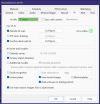
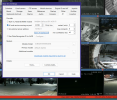
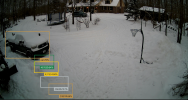
I cannot get the AI to give me good results anymore. Even my AI helper was able to identify the plate in this screenshot, CPAI is going nuts.
1769470170674.png
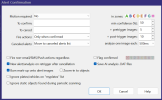
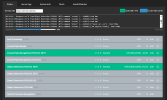
1769470331130.png1769470359062.png
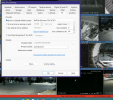
1769470467127.png

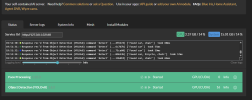
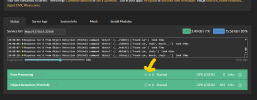
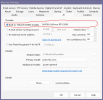
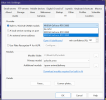
If I don't tun on Periodic AI Scan, Primary Object Detect & License Plates I get no plate detections at all.

Anyone had any luck getting this to work?
 
  • Like
Reactions: Flintstone61
You have nothing listed in your To Confirm. You need like person,car etc.


Sent from my iPhone using Tapatalk
 
That's just for alert confirmation isn't it? I'm more concerned that it's hallucinating three different plate numbers. It used to identify the plate no problem, now it's putting bounding boxes where there is no plate, I had tried putting DayPlate and NightPlate in the confirm box but they weren't doing the trick either.
 
My fault. This is for ALPR only. Thought this was for normal AI detection.
 
Not to hijack my own thread or anything, but the AI in Blue Iris uses way too much CPU. With CPAI running detection my CPU averages around 7-17% with spikes into the 30% range.

When I try to use the built-in AI it is steady around 30-40% and frequently maxes out the CPU at 100%. I have tried all the tips and tricks for lowering CPU usage which is why my CPAI runs around 7% but just switching from CPAI to the built-in AI increases my CPU usage 5x at least. There doesn't seem to be any setting that doesn't swamp my CPU.

i9-9900k with 32GB RAM, GPU is an RTX 3080 with 12GB VRAM.
 
Is there any chance the CPAI Is running behind the scenes alongside BI's AI?
I had the opposite effect on my CPU (went down) when I switched from CPAI GPU to Bi's AI. never hit 100% ever on this machine.
You might have a menu switch that is eating cpu cycles somewhere.
1769478559158.png1769478704031.png1769478732147.png
 
update, Hmmm. After initial spikes, CPAI seems to have settled down just about back to a similar resource consumption of the other BI Ai.
I may not be doing an exact Apples to Apples resource consumption ( because of my Neolithic primate condition) but it's an example to share.
But I am hearing a lot more GPU fan noise ramp ups and ramp downs in CPAI mode.
 
Is there a shutdown switch im missing dor CPAI or do i have to go into the dashboard and stop the modules?
 
Is there a shutdown switch im missing dor CPAI or do i have to go into the dashboard and stop the modules?
I would think it should be right there in the dashboard, But i am not the expert. but you could do a CTRL/ALT/Del and see whats running in task mgr.
and or your global hardware decode settings might need to be changed/adjusted/tweaked when your on Bi AI....
 
The only reason i might go back to the Built in BI AI, is that the PC runs quieter without fan ramp ups.
 
Hey Mike!

You mean like through windows services or just change the radio button from using CPAI to the internal blue iris AI? I did as Flintstone recommended and yeah CPAI was still running detections in the background after I changed to the internal one.
 
if you go to the CPAI web browser page you can stop services
1769479738535.png
 
OH my God I've been a member since Feb 4 2020? 6 years and i still know Jack Shit.
 
Yeah that's what I thought, I had done that and my cousin usage was still spiking to max, I wish it had an internal resource monitor to tell which camera or model was doing all the hogging.
 
Are you guys using any additional models? If so, which ones? I have all of Mikes -v5 models as well as faces and delivery but even turning them all off and just using Primary Object Detection is just killing my CPU. Which base model are you using?

Edit: the -v5 models were getting detected with CPAI, once I switched back to BI AI it's just detecting ipcam-dark, ipcam-animal, delivery, package. I turned off all ALPR and facial recognition on all the cameras and just use Primary Object and yolo8s and it's still spiking my CPU and using 20gb of RAM.
 
Last edited:
Are you guys using any additional models? If so, which ones? I have all of Mikes -v5 models as well as faces and delivery but even turning them all off and just using Primary Object Detection is just killing my CPU. Which base model are you using?

Edit: the -v5 models were getting detected with CPAI, once I switched back to BI AI it's just detecting ipcam-dark, ipcam-animal, delivery, package. I turned off all ALPR and facial recognition on all the cameras and just use Primary Object and yolo8s and it's still spiking my CPU and using 20gb of RAM.
In the Main AI settings make sure you have a GPU selected and it does not say No GPU

1769489199398.png