Hello,
We need technical support assistance regarding a recurring and critical issue with Dahua PTZ thermal cameras.
Devices and background
Problem description
The cameras started showing unstable behavior:
Actions already taken:
After that:
Algorithm observation
Important operational note
This situation is not acceptable:
any ideas what is the problem and how to fix this weird issue? Thank you!
————- CAM SPECKS ————
System Version:2.651.0000000.4.RBuild Date:2025-10-29
PTZ Version:V2.401.0000000.1.RHNZ_191031
Device Model DHI-TPC-SD2241-T
System Version
V2.651.0000000.4.R, Build Date: 2025-10-29
Web Version V5.0.1.2343292
PTZ Version
V2.401.0000000.1.RHNZ_191031
Algorithm Version 2.0
Thermal Module Version
MSR00F20250908
Intelligent Version V2.008.20241022
Heat Algorithm Version V2.0.40388
Thermal Module ISP Algorithm Version
V2.1.3
Temp Measurement Algorithm Version
RT.1.2.3
We need technical support assistance regarding a recurring and critical issue with Dahua PTZ thermal cameras.
Devices and background
- Model: Dahua TPC-SD2241-T
- Quantity: 7 pcs
- All cameras from the same batch
- Installed at customer site in December
- All cameras are connected to the same network and switches
Problem description
The cameras started showing unstable behavior:
- Cameras repeatedly go online/offline
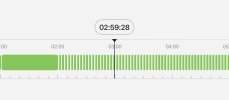
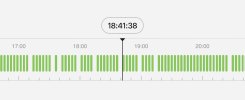
- 24/7 continuous recording breaks approximately every 30–60 seconds
- Issue appears automatically after a few days of normal operation
- tour function stopped when the problem occurs or freezed because all image files after malfunction are from one preset.
Actions already taken:
- Updated all cameras to the latest firmware
- Performed factory reset on all cameras on site
- changed ip addresses of all cameras and whole network scanned to ensure there is no dublicate ip’s etc.
- Reconfigured thermal detection and presets
- Physically replaced one camera
- Network verified (no network issues detected)
- After reset, cameras work normally for approx. 5 days
After that:
- Following the automatic reboot at 02:00, 3 out of 7 cameras start malfunctioning again
- On the recorder, video appears and disappears repeatedly
- Some cameras become completely unreachable remotely
- 4 out of 7 cameras continue to perform tour function and there is 24/7 recording going but cant login to cameras with pc.
- Over time the issue escalates and eventually none of the thermal cameras can be accessed
Algorithm observation
- Some cameras run Temperature Measurement Algorithm RT1.2.3
- Some run RT0.0.0
- No other configuration or hardware differences
- Based on our experience, both algorithm versions should be stable
Important operational note
This situation is not acceptable:
- We cannot visit the site every few weeks to perform factory resets (cameras are mounted high and require a lift)
- The issue is clearly reproducible and recurring
any ideas what is the problem and how to fix this weird issue? Thank you!
————- CAM SPECKS ————
System Version:2.651.0000000.4.RBuild Date:2025-10-29
PTZ Version:V2.401.0000000.1.RHNZ_191031
Device Model DHI-TPC-SD2241-T
System Version
V2.651.0000000.4.R, Build Date: 2025-10-29
Web Version V5.0.1.2343292
PTZ Version
V2.401.0000000.1.RHNZ_191031
Algorithm Version 2.0
Thermal Module Version
MSR00F20250908
Intelligent Version V2.008.20241022
Heat Algorithm Version V2.0.40388
Thermal Module ISP Algorithm Version
V2.1.3
Temp Measurement Algorithm Version
RT.1.2.3