

How do you get LPR to work in Blue Iris?
- Thread starter Arjun
- Start date
You are using an out of date browser. It may not display this or other websites correctly.
You should upgrade or use an alternative browser.
You should upgrade or use an alternative browser.

Bruce_H
Getting comfortable
I know nothing about the LPR system, but it may be useful to confirm the version of BI you are using and are you using the built in AI or the external CPAI, have you looked in canceled alerts, to see what is there, have you enabled the DAT file option for that camera, is the camera detecting the motion? These are all basic questions the might point you or someone else in the correct direction!

Bruce_H
Getting comfortable
Are you also having high cpu usage issues in another thread, could this be preventing the LPR system from working correctly due to delays in processing, just a guess?
Thats a different issue, I realized that the CPU usage is actually within normal limits and is not a cause of concern at this timeAre you also having high cpu usage issues in another thread, could this be preventing the LPR system from working correctly due to delays in processing, just a guess?
I enabled the LPR feature in Blue Iris 6 and CPU usage intermittently spikes to 68%
Bruce_H
Getting comfortable
There are several threads on issues with the LPR system, have you looked at them, here is one of them Blue Iris Version 6 License Plate Custom Model
Sorry I know anything further as I don't use the LPR system, and have no need for it!
Sorry I know anything further as I don't use the LPR system, and have no need for it!

MikeLud1
IPCT Contributor
Here are my LPR AI settings. My LPR camera is set to 20 FPS, with the below setting when the LPR camera is triggered ever frame will be processed by the AI
Main AI settings

LPR camera AI settings
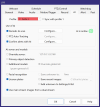
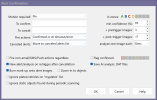
Main AI settings
LPR camera AI settings


Out of curiosity, how do you have your periodic AI scan setup for your LPR cam?Here are my LPR AI settings.
Skinny1
Getting the hang of it
Mike,Here are my LPR AI settings. My LPR camera is set to 20 FPS, with the below setting when the LPR camera is triggered ever frame will be processed by the AI
Main AI settings
View attachment 236313
LPR camera AI settings
View attachment 236314
View attachment 236315
What models are you using and where did you get them? I am running the models that came with BI6 with the exception of the License-Plate which I got from you.
Rick
MikeLud1
IPCT Contributor
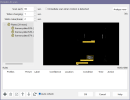
I had it set like this before todays release, I do not like the change from todays release, now it just has Scan eachOut of curiosity, how do you have your periodic AI scan setup for your LPR cam?
Last edited:
This is feedback I hope can be conveyed, seen, and acknowledged by the Blue Iris developer teamI had it set like this before todays release, I do not like the change from todays release, now it just has Scan each
View attachment 236330