[Release] OpenVINO for BI

mpl

Young grasshopper
Nov 6, 2023
35
17
Germany
Hello everyone, let me introduce: OpenVINO for Blue Iris.
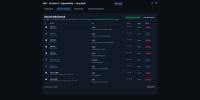
Over the past few days I’ve been working with OpenVINO + YOLOv11 and put together my first working object and face detection setup.


Running on the Intel NPU (Intel Core Ultra 5 245). CPU/GPU works too


Current status:
  • Object detection
  • Face detection
  • Face recognition
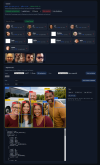
  • Unknown facesare saved and currently need to be assigned manually:
    1. Move the image into the matching folder (person’s name)
    2. Run the learning/update script afterwards
      → this improves the recognition rate.

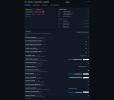
Whats for me still missing is a proper API integration with Blue Iris so the whole thing can be integrated more cleanly. Right now, the settings are still configured via a Python config.

Does anyone have the BI(6) API details or example requests for that?


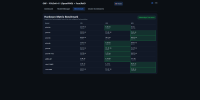
Performance (NPU on my system):
  • YOLO nano: ~15%
  • YOLO small: ~20–25%
  • YOLO medium: ~25–30%
  • YOLO large: >30%

Do people actually need “large”, or is that overkill for everyday use?
Without face recognition it runs a little bit faster.

Would anyone be interested in this (e.g., code, setup guide, or a small release), or should I keep it as a private project?


PS: I also have a Coral USB Accelerator and a Dual Coral PCIe Accelerator incl. PCIe adapter for sale

Please test it; I still need to clean up a few things, but it's already running stable.


Blueiris Settings:


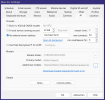
To identify the camera used in OBF, we need to assign a different model to each camera in BI. In fact, the model is determined by OBF. This is just a minor workaround.
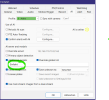
Go to Camera Settings -> "AI" -> Check "Addition models" and "Override global list" and the name from your cam.


View attachment 236563


View attachment 236562
 
Last edited:
  • Like
Reactions: mat200
Give me a few more days, I still need to fix a few errors and finish translating it.
 

Attachments

  • screencapture-192-168-178-70-32168-gui-2026-01-13-22_19_46.png
    screencapture-192-168-178-70-32168-gui-2026-01-13-22_19_46.png
    105.2 KB · Views: 29
  • screencapture-192-168-178-70-32168-gui-2026-01-13-22_15_21.png
    screencapture-192-168-178-70-32168-gui-2026-01-13-22_15_21.png
    138.1 KB · Views: 29
  • screencapture-192-168-178-70-32168-gui-2026-01-13-22_14_472.png
    screencapture-192-168-178-70-32168-gui-2026-01-13-22_14_472.png
    1 MB · Views: 28
  • screencapture-192-168-178-70-32168-gui-2026-01-13-22_32_47.png
    screencapture-192-168-178-70-32168-gui-2026-01-13-22_32_47.png
    130.6 KB · Views: 29
  • Like
Reactions: mat200
Please test it; I still need to clean up a few things, but it's already running stable.


Setup:


1.

Install Python 3.11.9 Install NPU Driver Intel® NPU-Treiber – Windows*

2.
Powershell ->
py -3.11 -m venv obf
.\obf\Scripts\activate
python.exe -m pip install -U pip
pip install -r requirements.txt
3.
Start App ->
python start.py


Starte main.py...
INFO obf.main: Starting server on 0.0.0.0:32168
INFO uvicorn: Started server process [1900]
INFO uvicorn: Waiting for application startup.
INFO obf.main: Startup: Pipeline disabled via config.
INFO uvicorn: Application startup complete.
INFO uvicorn: Uvicorn running on (Press CTRL+C to quit)
INFO uvicorn: 192.168.178.70:57707 - "WebSocket /ws" [accepted]
INFO uvicorn: connection open


4. Open GUI 5. Model Manager -> Select Models(yolo11s,yolov8n-face,w600k_mbf) -> Download - wait until Job finished without erros
Dashboard -> Unknown Faces -> Add user(s)
Face DB Tools -> Build (+Prune+Eval) - wait until Job finished without errors
6. Dashboard -> Enable Pipeline (AI Pipeline Master Switch) -> Save and restart
7. Goto Gui and change settings for you. (Restart after Save&Apply)
8. Try it with Quicktest and some pictures.


Blueiris Settings:


To identify the camera used in OBF, we need to assign a different model to each camera in BI. In fact, the model is determined by OBF. This is just a minor workaround.
Go to Camera Settings -> "AI" -> Check "Addition models" and "Override global list" and the name from your cam.


1768749437206.png


1768749353832.png
 

Attachments

Last edited:
  • Like
Reactions: mat200
Thanks. Was able to get it going. Had to enable script execution in power shell. also I don't have a core ultra CPU, but an 8th gen core i5, so no NPU. However it still works and ran them benchmark. Around 48ms inference times, slightly better on GPU. Will play around with it some and see how it performs. I'm Blue Iris AI, I was getting about 300-900ms processing, with the OpenVino about 120ms. Not sure how equivalent the processing is though.
 
Don't compare the inference times from my script/OpenVINO with BI's times. The benchmark isn't really meaningful. You can only judge it once you know the times in relation to your camera image.

You don't necessarily have to use PowerShell; CMD should work just as well.
 
Understood on the benchmark, was just providing a relative comparison.So far it is working well with my IP4K-T cameras, able to detect people, dog, car, around 120ms processing times. One minor thing is the Open AI Dashboard link in BI AI configuration tab just opens the server page, not the /gui page. Can you add a redirect?
 
I keep getting this error:
[DEPS] Dependency preflight failed.
[DEPS] Checked: C:\Data\apps\OBF-Vision-main\requirements.txt
[DEPS]
[DEPS] Missing/broken imports:
- openvino==2025.4.1 (import 'openvino') -> ImportError: DLL load failed while importing _pyopenvino: The specified module could not be found.
- ultralytics==8.3.241 (import 'ultralytics') -> ImportError: DLL load failed while importing _pyopenvino: The specified module could not be found.

[DEPS] Fix:
python -m pip install -r requirements.txt

I did run the install requirements and it says all packages already installed
 
Last edited:
Take Python 3.11.9 and Setup venv "py -3.11 -m venv obf"

Have you installed vcredist?
 
Last edited:
Last edited:
Now unable to download the models, got a certificate error -> Download Fehler: <urlopen error [SSL: CERTIFICATE_VERIFY_FAILED] certificate verify failed: unable to get local issuer certificate (_ssl.c:1035)>
CRITICAL ERROR: <urlopen error [SSL: CERTIFICATE_VERIFY_FAILED] certificate verify failed: unable to get local issuer certificate (_ssl.c:1035)>

fixed -> pip install pip-system-certs
 
Last edited:
looks amazing so far. using medium yolo11 model on an i5 6500T the inference times on analysis looks really good. will report back findings.
whats the best way to ensure server is always running on crash or system restart?. A task schedule with a batch script ?
 
If you start it via start.py, the watchdog runs along with it and restarts the main script main.py in case of a crash.
 
If you start it via start.py, the watchdog runs along with it and restarts the main script main.py in case of a crash.
Sounds good.
Early days but I've never seen such strong igpu utilisation.
Openvino is impressive.
Thank you for writing this code. I didn't expect such good performance on my ancient processor. Very accurate and fast.
I'll keep an eye on how it handles load when overloaded with triggers.
 
next features:

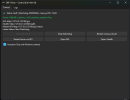
Win GUI for the Watchdog:

1769027864303.png


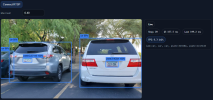
ALPR:
1769027924090.png


Detecors:
"yolo-v9-s-608-license-plate-end2end",
"yolo-v9-t-640-license-plate-end2end",
"yolo-v9-t-512-license-plate-end2end",
"yolo-v9-t-416-license-plate-end2end",
"yolo-v9-t-384-license-plate-end2end",
"yolo-v9-t-256-license-plate-end2end",

OCR:
"cct-s-v1-global-model",
"cct-xs-v1-global-model",
"argentinian-plates-cnn-model",
"argentinian-plates-cnn-synth-model",
"european-plates-mobile-vit-v2-model",
"global-plates-mobile-vit-v2-model",
"cct-s-relu-v1-global-model",
"cct-xs-relu-v1-global-model",

in a few days...