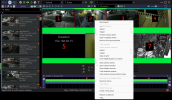
Why did they remove the "show disabled cameras" menu button??? How to get back a disabled camera.

You could also click on the status button and look on the camera tab, it show all hidden and disabled cameras, double click on a camera and the setup window will open and you can change the camera status!
This works. Thank you. Do not know why this has become a complicated procedure?
 
Cannot make it work this way. I get the option to edit the layout and can do nothing else.
Once you click it then right click and uncheck the option to hide disabled cameras. The disabled cams will show on your screen with the active cameras but then you have to click the edit layout again to continue normal operations and remove the cameras numbering from the screen. Then you may right click that disabled camera and select ENABLE . When they made that change a couple years back it took some getting used to.
 
Last edited:
  • Like
Reactions: walkjp1
Once you click it then right click and uncheck the option to hide disabled cameras. The disabled cams will show on your screen with the active cameras but then you have to click the edit layout again to continue normal operations and remove the cameras numbering from the screen. Then you may right click that disabled camera and select ENABLE . When they made that change a couple years back it took some getting used to.
Thank you. But have been unable to make it work this way at the server with version 6.
 
Here is a quick video where I will disable a camera then reenable it. Sometimes the cursor did not show properly. All of the pop out menus were from right clicks. Note that you have to get out of the "Edit Layout" screen before selecting a camera to enable. The video did not show my mouse moving down to the lower right camera to enable it after I clicked on the Edit button. I am also on version 6.0.1.13
View attachment BIeditlayout.mp4
 
Last edited:
  • Like
Reactions: walkjp1
Here is a quick video where I will disable a camera then reenable it. Sometimes the cursor did not show properly. All of the pop out menus were from right clicks. Note that you have to get out of the "Edit Layout" screen before selecting a camera to enable. The video did not show my mouse moving down to the lower right camera to enable it after I clicked on the Edit button. I am also on version 6.0.1.13
View attachment 236209
Thank you, got it now.