Hello!! Please help!
HIKVISION IDS-TCM203-a (firmware V5.1.6)
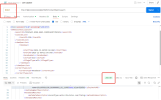
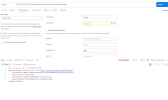
POST http://......./ISAPI/Traffic/channels/1/vehicleDetect/plates
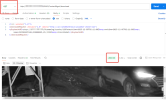
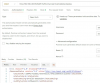
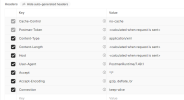
I did everything the same way and checked both the authorization and the headers, but the response is still 403
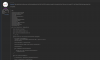
I also ran a script to check for available endpoints, and this is what I got.
======================================================================
? /ISAPI/AccessControl [GET] 403
? /ISAPI/AccessControl/AcsEvent [GET] 403
? /ISAPI/AccessControl/ [GET] 403
? /ISAPI/AccessControl/User [GET] 403
? /ISAPI/AccessControl/events [GET] 403
? /ISAPI/AccessControl/Record [GET] 403
? /ISAPI/AccessControl/event [GET] 403
? /ISAPI/AccessControl/Door [GET] 403
? /ISAPI/AccessControl/Card [GET] 403
? /ISAPI/AccessControl/Terminal [GET] 403
? /ISAPI/AccessControl/Users [GET] 403
? /ISAPI/Traffic/ [GET] 403
? /ISAPI/Traffic/channels/ [GET] 403
? /ISAPI/Smart/Traffic [GET] 403
? /ISAPI/Traffic/channels [GET] 403
? /ISAPI/AccessControl/UserInfo [GET] 403
? /ISAPI/Intelligent/Traffic [GET] 403
? /ISAPI/AccessControl/cards [GET] 403
? /ISAPI/AccessControl/Events [GET] 403
? /ISAPI/VideoIntelligence/traffic [GET] 403
? /ISAPI/LPR/ [GET] 403
? /ISAPI/Traffic [GET] 403
✓ /ISAPI/Event/Triggers [GET] 200 OK (1384 bytes)
? /ISAPI/Vehicles/ [GET] 403
? /ISAPI/Event/Alarm [GET] 403
? /ISAPI/Plate/ [GET] 403
? /ISAPI/PlateRecognition [GET] 403
? /ISAPI/Event/ [GET] 403
? /ISAPI/ANPR/ [GET] 403
? /ISAPI/Event/Trigger [GET] 403
? /ISAPI/Event/Notification [GET] 403
? /ISAPI/Event [GET] 403
? /ISAPI/ContentMgmt/search [GET] 400
? /ISAPI/Event/Action [GET] 403
? /ISAPI/Plates/ [GET] 403
? /ISAPI/Vehicle/ [GET] 403
? /ISAPI/Event/Actions [GET] 403
? /ISAPI/Event/Alarms [GET] 403
? /ISAPI/ContentMgmt/ [GET] 403
? /ISAPI/ContentMgmt [GET] 403
? /ISAPI/ContentMgmt/record [GET] 403
✓ /ISAPI/Streaming/channels [GET] 200 OK (4552 bytes)
✓ /ISAPI/Streaming/Channels [GET] 200 OK (4552 bytes)
? /ISAPI/ContentMgmt/records [GET] 403
? /ISAPI/ContentMgmt/Storage [GET] 403
? /ISAPI/Event/Notifications [GET] 403
? /ISAPI/System/log [GET] 403
? /ISAPI/Streaming [GET] 403
? /ISAPI/System [GET] 403
? /ISAPI/System/Logs [GET] 403
? /ISAPI/Streaming/ [GET] 403
? /ISAPI/System/info [GET] 403
? /ISAPI/ContentMgmt/media [GET] 403
? /ISAPI/System/ [GET] 403
✓ /ISAPI/Security/users [GET] 200 OK (625 bytes)
? /ISAPI/ContentMgmt/Media [GET] 403
? /ISAPI/ContentMgmt/Media [GET] 403
✓ /ISAPI/System/Status [GET] 200 OK (829 bytes)
✓ /ISAPI/Security/Users [GET] 200 OK (625 bytes)
? /ISAPI/PTZCtrl/ [GET] 403
? /ISAPI/Image [GET] 403
? /ISAPI/PTZCtrl [GET] 403
? /ISAPI/Streaming/Status [GET] 403
? /ISAPI/Image/Channels [GET] 403
? /ISAPI/System/Info [GET] 403
? /ISAPI/Image/channels [GET] 403
? /ISAPI/Image/ [GET] 403
? /ISAPI/Network/Interfaces [GET] 403
? /ISAPI/Network [GET] 403
? /ISAPI/Security [GET] 403
? /ISAPI/Security/ [GET] 403
? /ISAPI/ver10/ [GET] 403
? /ISAPI/Network/interfaces [GET] 403
? /ISAPI/ver20/ [GET] 403
? /ISAPI/v1.0/ [GET] 403
? /ISAPI/Security/Session [GET] 403
? /ISAPI/v2.0/ [GET] 403
? /ISAPI/Network/ [GET] 403
? /ISAPI/Security/session [GET] 403
======================================================================
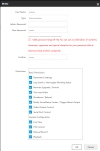
I understand that the account doesn't have permissions for remote access via ISAPI. There's no such option in the camera's access permissions settings. Can you clarify for me?
Is it only possible to retrieve photos from this camera's memory card via the web?
Thanks for the answers



 ipcamtalk.com




 ort}
ort}