Warm LED Camera Light

MarkusAgustus

Getting the hang of it
May 26, 2018
52
70
Canada
Hello,

I'm looking for a new camera. My IPC-B5442E-Z4E stopped working. I'm considering buying the 6mm EmpireTech 4K Bullet IP Camera Warm LED IP67 with 1/1.2 sensor. I've never owned a camera with the warm LED lights. I have a few questions about them.

1. Are these LED lights on all the time?
2. Are the LED lights triggered on motion?
3. How bright are they?
- I've seen many videos from the perspective of the camera but none looking at the camera that shows how much they illuminate.
4. Can the LED lights be controlled? Turned on or off through software?

I'm just trying to get a sense for what the cameras will look like when the LED light is engaged and if it is on all the time. All my current cameras have IR lights so they are not too obvious. Please advise. Thank you..
 
I have a Uniview Owl VIew which has the 1/1.8 shutter, and "warm light". There are no IR lights. The white light is not on all the time, and (on my camera) you can disable if you wish. This would be the option if the camera is at a place which has good surrounding lights (ie. parking lot, well lit streetlights, etc.).
My camera is in the backyard. On very dark, clear nights, the "warm light" comes on automatically. On overcast/cloudy nights, there is sufficient "indirect light" which lets the camera capture the image quite well w/o the white light. On moon lit nights, esp. on full moon, the camera image looks like daylight. Not kidding.
(I posted pictures under thread "Cameras" "Uniview" "Owl View". Some members claimed the screen capture was fakes or actually at night. It wasn't Depending on light, motion sometimes is a bit blurred, but on full moon nights the motion is clear as in daylight.

Your 1/1.2 sensor shold be even better.

As to the question of triggered, no it is either on or off on the Owl View. Check the docs for the one you are looking at.
They do not trigger on motion on the Owl view and perhaps same on yours. My other cameras with IR lights, those are on at night all the time, no motion activation.
How bright? It's a dim light about the same as an old car's dome light with the yellowed plastic cover, or a dim AA cell flashlight/pen light.
You can easliy notice the white light is on vs an IR camera with the dim red dots. Thw white light is much more noticable, but it is in no way like a flood light.
Some cameras DO have a motion activation (intruder), even with flashing red/blue light to scare away trespassers. I don't want anything like that.
Again check the specs on your camera. They all have different settings or options. For my residential application, I do not want to draw attention to the camera.
But in a business/commercial area, having the intruder light flash and some even have an audible alarm. Depends on what you want.
 
Last edited:
  • Like
Reactions: MarkusAgustus
Hello,

I'm looking for a new camera. My IPC-B5442E-Z4E stopped working. I'm considering buying the 6mm EmpireTech 4K Bullet IP Camera Warm LED IP67 with 1/1.2 sensor. I've never owned a camera with the warm LED lights. I have a few questions about them.

1. Are these LED lights on all the time?
2. Are the LED lights triggered on motion?
3. How bright are they?
- I've seen many videos from the perspective of the camera but none looking at the camera that shows how much they illuminate.
4. Can the LED lights be controlled? Turned on or off through software?

I'm just trying to get a sense for what the cameras will look like when the LED light is engaged and if it is on all the time. All my current cameras have IR lights so they are not too obvious. Please advise. Thank you..

1- Yes if you dont have enough ambient light at night. Cameras need light
2- No
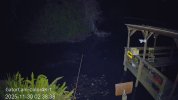
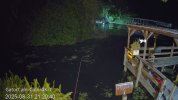
3- realistically 25-30ft of usable light, but you'll see some out to 50. They're bright you're not going to hide them
4- yes you can set the time they come on and off and the brightness

They cant see IR and have no IR

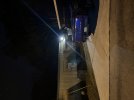
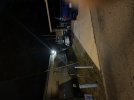
About 25ft to far edge of dock, another 25-30ft across canal


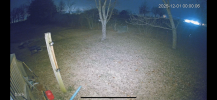
192.168.1.110_GatorCam-Color4K-T_main_20251130023838_@1.jpg

With added floods behind the camera to its right
192.168.1.110_GatorCam-Color4K-T_main_20250831212041_@1.jpg
 
Okay, thank you for the replies. Much appreciated... Hopefully there is a Cyber Monday sale.. :)

Just be sure on replacing the Z4

First because it’s rare for them just to “stop working” you may have a cable, networking, or settings issue.

Secondly because a Z4 with up to 32mm of zoom is very different than a fixed 6mm camera regardless of the series or brand.

The Z4 and the 4K-X are very different cameras with typically very different purposes
 
Yes, quite sure this is not networking, cable or settings. I haven't opened the junction box yet but I'm doubtful that it is the connection either. I used dielectric grease and wrapped the connection with coax seal and electrical tape. Oddly enough, the camera started working again, but checking the logs I also discovered that this camera has been disconnecting for shorter periods of time that I did not notice. Yesterday\today it went down for 14 hours and then came back. I am not 100% sure but I think it is the camera. I do know that my other 7 cameras are doing just fine. They have all been running for years and all 8 of my cameras were installed using the same gear, technique, etc.

When I first purchased the B5442E-Z4E I wanted a zoom that could capture a good image at about 100 feet. This camera did that quite well, albeit a smaller focal view. Then I built a large garage and the original job I had given this camera changed. After the garage went up I changed the setting to 8mm, more of an distant overview. My new garage has two cameras outside and 1 inside so it has decent coverage. Which leads me to thinking that the 6mm 4K 1/1.2 camera will suffice for job the Z4E evolved to. If it turns out that there is a connection issue on the B5442E-Z4E I will just put it somewhere else... :) Who said it here... cameras multiply like rabbits... It's a great excuse for the wife that we needed a new camera because of a technical problem...

It's been a while since I have done anything with my setup. For the most part it just runs without issue. Blue Iris has been very solid and all my cameras, too. Thanks for the input, much appreciated!
 
Do you have an SD card in the camera? If so, a failing card can exhibit these behaviors.

As can a corrupt firmware, so if you get it down and bench test it, factory reset it and see if that gets it going.
 
There is no SD card in the camera. Updating the firmware is a good idea. At this point I have to conclude the issue is intermittent. It worked all last night. Previous few days it went offline several times for short periods of time, 5 10 minutes, before coming back online. One period was about 14 hours... I'm leaning towards replacing it and then moving it to a location that is not as important. If it completely dies then it's not the end of the world.
 
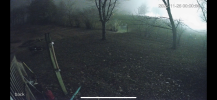
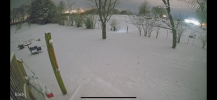
Not a real fair comparison because the pic with snow not only has the light on but the snow and almost full moon to reflect light. Other pic was from a week and a half ago.
 

Attachments

  • IMG_7005.png
    IMG_7005.png
    4.5 MB · Views: 6
^But at what shutter speed and gain? Any camera can look like noon at midnight if you slow down the shutter and crank up the gain.