Long range transmission on HIKVISION DS-3E1106P-EI/M 4 POE Switch

toasty

n3wb
Nov 30, 2025
4
0
malaysia
I have a DS-3E1106P-EI/M switch that has 2 red long-range POE ports that claim to be able to support 300m distance (by dropping the data rate to 10Mbps), and 2 normal POE ports, presumably at 100m distance and at normal speed. I have a camera at about 150m away. When I plug it into the red port the camera undergoes initialization stages, the LED's light up and the camera rotates (it's a DS-2DE2A204IW-DE3 PTZ), but the camera does not register on my LAN. I can't see it with SADP nor with the NVR. I tried reducing the BW of the ports manually, but the camera still does not appear. The green LED lights up when I plug the ethernet into the switch, but the orange LED remains off.

Can anyone help out on getting the camera working at 150m distance from the switch?

TIA
 
Have you tried it with a short cable first to confirm you can see it? If you can't see it, did you do a factory reset in the event it was somehow previously assigned an IP address.

If you can see it with a known short cable and not the long cable, either you have a bad connection or the camera demands too much and it right on edge of available power at that distance.
 
  • Like
Reactions: Photon Farmer
So the camera was working before but I had put a PoE extender in the middle. Then someone was cutting the grass and the POE extender was damaged along with the cable. We laid another cable and at that time I found out the about the long-range port on the POE switch and I thought that was a better solution than cutting the cable in the middle to insert the extender. However this long-range port is not going the 150m needed.

I have tested the cable itself with an ethernet tester (we crimp the cable ourselves) and all 8 wires inside are good and connect on both ends. I have troubleshoot it to the point that I am fairly certain it is a communication issue (not a POE issue, because the camera responds when I plug the cable in). The red-port on the switch does not seem able to perform at 150m, despite what Hikvision claims...

I wondered if anyone else has gotten the long-range ports to work at distance over 100m?

According to chatGPT, the switch is supposed to drop the transmission rate from Gbps down to 10Mbps in order to increase the distance up to 300m, which makes sense, except it doesn't seem to work for me.
 
The consumer grade testers only test continuity. Unless you are using a true Fluke tester (that costs thousands of dollars LOL), the cheap testers simply measure continuity and can pass that, but not be sufficient for POE loading. Especially if it is CCA wiring.

So it could still be a connection issue, but like I said, it is likely the camera power needs are more than what the long distance can provide.

You are trying a PTZ that is more power hungry than a fixed cam. Toss a fixed cam at the end and see if it works. If it does, then you know the extender isn't cut out for the energy requirements of a PTZ.
 
  • Like
Reactions: alastairstevenson
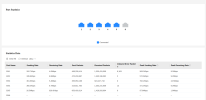
I am about to go down to the site to do the tests, but meanwhile, I got a screenshot of the DS-3E1106P-EI/M web-page on the statistics (attached). Eth1, is the long range test. The current situation is:
1) about 150m run plugged into eth port 1 on the switch, other end connected to the PTZ camera (DS-2DE2A204IW-DE3)
2) green LED lights up solid on switch, but orange LED is off
3) camera at other end goes through initialization lights and initial PTZ movement
4) But no camera seen in SADP (Camera static IP: 192.168.1.36, laptop IP 192.168.1.100)
5) No camera detected on NVR, and cannot ping 192.168.1.36
6) The switch web-interface indicated a connection on eth1, but the error rate seems to be very high as shown in the screenshot
7) Data rate according switch web-interface is 10Mbps/Full duplex.
8) The wiring order is T568B

It looks to me like there is some communication occurring between the camera and the switch, but that the error rate is too high for it to be useable.

I am thinking I am going to cut-off the RJ45 heads and recrimp them. They were done by workmen who are general workers, not specialists in ethernet cabling (I'm not specialist either, but I think I've done more RJ45 crimping than they have)

Any additional insights or comments appreciated.
 

Attachments

  • Screenshot from 2025-12-02 15-50-31.png
    Screenshot from 2025-12-02 15-50-31.png
    68.3 KB · Views: 3
If you have a non ptz cam try it out there. Your ptz is probably needing to much power for that distance without having that extender in the middle. And I’m not sure about Hik but dahua has their Epoe that requires both epoe port on nvr/switch and, epoe camera. But I’m not sure they have a epoe ptz.