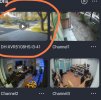
I have my cameras in the app which seems fine. I also have the XVR model showing as box like a preview with the channels (doesn’t really seem to do anything). When I hit play the Xvr is not there only the cameras. I have several nvr/xvr and this is happening for the first time. Any help will be appreciated.
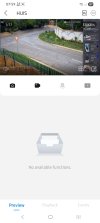
Dahua XVR model appears on DMSS as first camera in the preview
- Thread starter nalbo86
- Start date
You are using an out of date browser. It may not display this or other websites correctly.
You should upgrade or use an alternative browser.
You should upgrade or use an alternative browser.

What app version?
Did you add the NVR to the app or cameras individually?
What method did you use to add it?
Picture?
I add the NVR by itself, using the serial number allowing P2P to work on the NVR. (I never enable P2P on the cameras themselves)
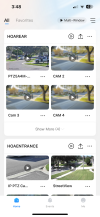
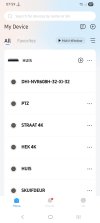
Home screen
Did you add the NVR to the app or cameras individually?
What method did you use to add it?
Picture?
I add the NVR by itself, using the serial number allowing P2P to work on the NVR. (I never enable P2P on the cameras themselves)
Home screen


Thanks for your fast reply
I’ve added the NVR via the app by scanning the QR code.
App version: 2.2.2
I’ve added the NVR via the app by scanning the QR code.
App version: 2.2.2
I wonder if that is zero channel setup?
Usually under Display on the NVR/XVR
Usually under Display on the NVR/XVR


Aquilles
n3wb
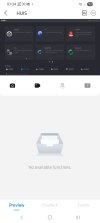
I'm seeing the same, the NVR model name as the first channel. Only happens for P2P access. What is strange is that this channel appears to be a screen mirror of sorts from my NVR console screen with showing the AI area and tracking, as if you viewing the live screen. I can see the cursor moving and I was even able to show me going to the settings menu. Besides that this feels wrong, and it's undocumented from what I can tell, I do have reservations on mirroring my NVR screen to the cloud and not to mention that my least expectation was that a CCTV app would stream my entire screen. Dahua support is giving me the run-around again so no help from them.
Attachments
Aquilles
n3wb
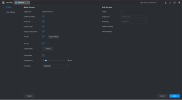
I think it has varied widely over the past 4-5 years as to where it’s hidden and if on some models, it’s even available
Yeah used to be under Display
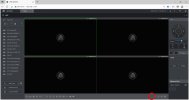
I no longer have my XVR so not certain … I’ll look on my older 5216-16P-4KS2E….
Yeah used to be under Display
I no longer have my XVR so not certain … I’ll look on my older 5216-16P-4KS2E….
Aquilles
n3wb
Thank you, does not seem like there is a way to disable this feature. Re: App - How do I remove it from the app other than removing the NVR and adding it again which I haven't tried. Dont want to risk doing all that work on setting up the subscribed notifications and losing past events if it is not going to work.
I honesty don’t know .
I think if it’s enabled on the NVR you’re going to get it on the app.
You could try adding the NVR again, a 2nd instance, but using the manual direct IP method. See if it still keeps the zero channel
I think if it’s enabled on the NVR you’re going to get it on the app.
You could try adding the NVR again, a 2nd instance, but using the manual direct IP method. See if it still keeps the zero channel
Aquilles
n3wb
The IP method is not showing the zero channel. Ok I'll bite the bullet and readd the NVR for P2P. I'll also look at enabling zero channel again to see if it popup in my app automatically (like it did this time) and if I have to readd the NVR once more to get it added. I'll post back here what I find.
Aquilles
n3wb
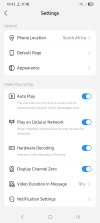
Ok I was looking for where to delete the NVR in the app (which is also not the same as before) and as I was going through the app I found the zero channel setting. So for anyone struggling with this, this setting is now in the app under general settings.