Few questions about TripWire and Intrusion...

Rockjaw

Young grasshopper
Jun 23, 2024
48
12
Canada
Hi everyone, I have 2 questions regarding this topic.

#1. I have went into Event and then IVS and I have setup my intrusion and trip wire line mappings and then under Smart Plan I highlighted the "Light Bulb" IVS and I can see the lines on my computer monitor that I have setup. It is working good as the event alarms are going off every time something crosses the lines. My question is... When I go into "Playback" or go into the "Event" to see what happened the lines are still there covering people faces and they are flashing so it's hard to get a clear picture of someone when the lines are all over. Is this normal or is there a setting to not see them during playback or when you go into the Alarm info.

#2. My 2nd question is... I have everything setup on the NVR for Trip wire etc. and on my phone I have the DMSS app. On the DMSS app under Me - Settings - Notification Settings - I have notifications turned on but nothing ever comes to my phone. I have checked my android settings for the app as well and it has notifications allowed for the app. Is there something simple I am missing?
 
1- what are you viewing? The NVR web interface with a browser?
If you use IE or Edge in IE mode you should see a toggle control to turn them off/on. Without IE/Rdge in IE mode you may not even see some controls
Also, when you download/export the video the IVS lines won’t be on it

2- complicated lots of moving pieces and options

  • make sure the NVR is setup to record the events
  • make sure push notifications are enabled on the NVR
  • add the NVR to DMSS via the serial number method
  • reboot the NVR
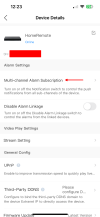
  • on the app go to device details, enable “multi channel alarm subscriptions” for each camera you want push alerts from

There’s more things to troubleshoot beyond that if it doesn’t work.
 
1- what are you viewing? The NVR web interface with a browser?
If you use IE or Edge in IE mode you should see a toggle control to turn them off/on. Without IE/Rdge in IE mode you may not even see some controls
Also, when you download/export the video the IVS lines won’t be on it

2- complicated lots of moving pieces and options

  • make sure the NVR is setup to record the events
  • make sure push notifications are enabled on the NVR
  • add the NVR to DMSS via the serial number method
  • reboot the NVR
  • on the app go to device details, enable “multi channel alarm subscriptions” for each camera you want push alerts from

There’s more things to troubleshoot beyond that if it doesn’t work.
Thank you for the reply.

#1. I am just using the main console of the NVR is where I am seeing the lines. I right mouse click on the screen and go to Playback and then I can pick a date and time to look. Or I click on Events from the main console and I can see them there as well.

#2. I have the recordings setup to record the events because I can go back at any time or day and view the recordings
Under Settings - Security - System Service I have mobile Push Notifications turned on
I did add it with the serial number
I haven't tried rebooting the NVR, I will try that
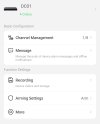
In the app I see device details but I don't see the “multi channel alarm subscriptions” option anywhere. I do see a "Message" and when I go into there that is enabled "Notification" receive messages and send notifications
 
I rebooted the NVR and walked outside. The NVR shows the alarm icon on and it captured me but nothing to my phone unfortunately.
 

Attachments

  • att.jpg
    att.jpg
    92.5 KB · Views: 14
I kinda wonder, what phone OS are you using?

Also just to be sure, are you on an NVR or an analog XVR? What model #

That don’t look right

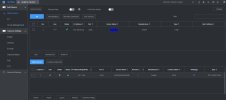
Does your NVR camera registration page look similar to this using the browser?
NewCamRegPage.jpg
 
Last edited:
I kinda wonder, what phone OS are you using?

Also just to be sure, are you on an NVR or an analog XVR? What model #

That don’t look right

Does your NVR camera registration page look similar to this using the browser?
View attachment 228272
Good morning,

My phone is a One Plus android phone version 12
I have an NVR5208 - 8P from Empire Tech

I will post 2 pictures

#1. The first picture is my camera settings (screen that you posted)
#2. This is what I see from a browser. You can see I'm missing the toggle switch you shown me in your video. I also don't have where you can make it 30 minutes 1 hour time frame when you are trying to zoom down to a specific time and make the search bar bigger (I can do that on my NVR)


It won't let me post the live camera page from the web. When I upload that file it shows blank (It's only 312KB as well, so it's not even big, just a screen shot) I could email you the picture if you want to see it.
 

Attachments

  • Camera Setting Page.JPG
    Camera Setting Page.JPG
    89 KB · Views: 8
Nothing your image #2

The search interface I showed in the video above is from the NVR search tab. (Playback)

The long slider at bottom right of screen is what allows you to zoom the timeline.

This is all on the NVR web gui, NOT the camera web gui

Two different things
 
Nothing your image #2

The search interface I showed in the video above is from the NVR search tab. (Playback)

The long slider at bottom right of screen is what allows you to zoom the timeline.

This is all on the NVR web gui, NOT the camera web gui

Two different things
Yes, I see that now on the NVR where I can toggle the trip wires off. Mine isn't just a click of the button like you are doing though. I have to click where you clicked and then I have 2 options AI Rule and AI Area. The AI Rule is selected and when I click the checkmark off of that box the lines do go away.

and yes, I am on the NVR looking at the camera registration page, sorry for the confusion, the picture I posted was on the NVR for my camera setup. I noticed in my picture I also don't have a MAC address like you do in yours.
 
My NVR is 8 years old. Yours is newer I think? Or maybe older LOL

What is the IP 192.168.50.38???
 
Yeah mine is only a few years old. That is my web IP for my NVR

OK thats really weird your NVR is showing in the camera list ... of your NVR! and that it shows ONVIF...

Anyway to you original problems, I think we solved one, the DMSS issue though I dont have an answer for.
Its possible there's something different about that newer NVR but I've never seen that, not having Multi channel alarm and the "channel management" control
 
OK thats really weird your NVR is showing in the camera list ... of your NVR! and that it shows ONVIF...

Anyway to you original problems, I think we solved one, the DMSS issue though I dont have an answer for.
Its possible there's something different about that newer NVR but I've never seen that, not having Multi channel alarm and the "channel management" control
So my dad has the same cameras and same NVR (we bought them together) and he receives notifications on his phone :/ Yeah, that's why I wanted to post on here incase someone had an idea. Thank you so much for trying.