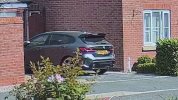
Video Blurry & audio not very clear on Hikvision DS-2CD2387G3-LIS2UY/SL

frank123

n3wb
Mar 27, 2019
29
4
UK
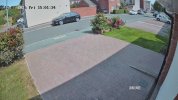
I've just had the Hikvision DS-2CD2387G3-LIS2UY/SL cameras installed but the image is very blurry, I can't even read the number plate on a car on a sunny day and there seems to be a lot of video noise. Please can someone help me fix this.

My settings for the cameras are:-
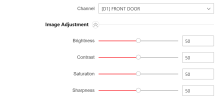
Image Adjustment.png


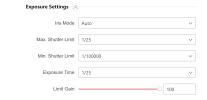
Exposure Settings.png


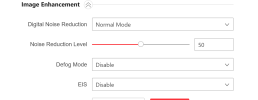
Image Enhancement.png


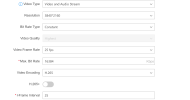
Video Parameter.png


How do I make the audio on the cameras more clearer?


Thank you
 
You wont get license plates at that distance with a camera of that type and lens (looks to be 2.8mm wide angle)

Also That is a digital zoomed image.
Digital zoom deteriorates the image and pixelates it. It only works in the movies and certain TV shows

That said, you exposure time is extremely slow (auto) and should be Manual and more like 1/1000 or 1/2000 during the day.
NR should be much lower also, I'd start at 20-25
Lastly, H.265 tends to not create the best image on surveillance cameras. Try h.264.h
 
+1 to all of the above.

At that distance it won't help much, but H264H will stand a slightly better chance than H265 with digital zoom, but you are asking too much from one camera field of view.
 
VIDEO

I have attached footage from my camera in the above link.

Is this motion blur or is this to with video noise?

What settings do I need to change on the camera?


Thank you
 
That looks more like tearing.
Can be caused by a number of things.

#1 would be to make sure your FPS and iFrame interval/rate are the same, which on the other camera they appear to be.


I've also seen that on a few cameras where IVS and MD were running simultaneously. Turn off old fashioned MD and use AI/IVS or whatever HiK calls it...
Also the h.265 encoding might do that

Its not noise or blur

What are your settings/
Did you adjust to what I suggested?