BI deleted camera still shows up in Home Assistant

GaryK4

Young grasshopper
Jan 20, 2015
44
2
I have BI integrated to HA using MQTT. I deleted a broken camera a while back and it does not show in BI. However, it still shows as a device in Home assistant. I tried removing the BI integration from HA, then re-adding it, but it still shows up. It also says it is connected, but it does not show up on the router.
Is the camera in some kind of hidden file within BI? Any idea how to delete it? HA will only let me disable it.
 
@GaryK4 If your integration from BI to Home Assistant (HA) is MQTT, then use MQTT Explorer to inspect if BI is sending net-new msgs to HA: MQTT Explorer

Given the brief info you shared, something else, maybe another camera, is sending msgs to HA using the same MQTT topic (as the deleted camera). At minimum, delete the MQTT topic for deleted camera in MQTT and make sure no new msgs appear for that MQTT topic.
 
Last edited:
In the config for the BI integration there's a reset checkbox. Try checking that to force it to reload the cams.

Also, if you go into Devices under the integration you should be able to disable it.
 
Last edited:
@GaryK4 If your integration from BI to Home Assistant (HA) is MQTT, then use MQTT Explorer to inspect if BI is sending net-new msgs to HA: MQTT Explorer

Given the brief info you shared, something else, maybe another camera, is sending msgs to HA using the same MQTT topic (as the deleted camera). At minimum, delete the MQTT topic for deleted camera in MQTT and make sure no new msgs appear for that MQTT topic.

I installed and ran the explorer. Under BlueIris, it just shows (2) of (4) valid cameras and the the obsolete camera. Unfortunately, I do not se IP addresses that would help.
In Blue Iris I have Debug logging enabled, but I don't know where that log file is.
 
In the config for the BI integration there's a reset checkbox. Try checking that to force it to reload the cams.

Also, if you go into Devices under the integration you should be able to disable it.

I don't see the reset checkbox. However, I manually reloaded both Blue Iris and MQTT integrations a number of time as well as a full reboot.
 
At the bottom here:

5pLSCza.png
 
@GaryK4 If your integration from BI to Home Assistant (HA) is MQTT, then use MQTT Explorer to inspect if BI is sending net-new msgs to HA: MQTT Explorer

Given the brief info you shared, something else, maybe another camera, is sending msgs to HA using the same MQTT topic (as the deleted camera). At minimum, delete the MQTT topic for deleted camera in MQTT and make sure no new msgs appear for that MQTT topic.

I installed and ran the explorer. Under BlueIris, it just shows (2) of (4) valid cameras and the the obsolete camera. Unfortunately, I do not se IP addresses that would help.
In Blue Iris I have Debug logging enabled, but I don't know where that log file is. On my router, I set IP's to manual
At the bottom here:

5pLSCza.png

I tried this and it did not help.
Below that, there were attribute items. I unchecked the camera from there. That removes it from the device list (workaround). Still strange.
 
Did you delete the cam or just disable it? If the latter, then HA (and some other things) will continue to pick up and show the cam. If the former, might check the registry for BI and see if the entry for the cam is stuck there for whatever reason. I'm guessing that it's probably just stuck as an entry as a device in HA somewhere.
 
@GaryK4 If your integration from BI to Home Assistant (HA) is MQTT, then use MQTT Explorer to inspect if BI is sending net-new msgs to HA: MQTT Explorer

Given the brief info you shared, something else, maybe another camera, is sending msgs to HA using the same MQTT topic (as the deleted camera). At minimum, delete the MQTT topic for deleted camera in MQTT and make sure no new msgs appear for that MQTT topic.

I installed and ran the explorer. Under BlueIris, it just shows (2) of (4) valid cameras and the the obsolete camera. Unfortunately, I do not se IP addresses that would help.
In Blue Iris I have Debug logging enabled, but I don't know where that log file is. On my router, I set IP's to manual
Did you delete the cam or just disable it? If the latter, then HA (and some other things) will continue to pick up and show the cam. If the former, might check the registry for BI and see if the entry for the cam is stuck there for whatever reason. I'm guessing that it's probably just stuck as an entry as a device in HA somewhere.

OK, It looks like I disabled it. I just looked in the desktop app and could not find and way to list all cameras. Then I tried the web app and that has a camera list menu item. From there, I can enable and unhide. From the desktop, I can not delete.
Thanks, problem solved!:)
 
I think the cam needs to be displayed to delete. If disabled and not displayed, click on the layout edit box (pen in a box icon) at the top right of the main console screen. Will turn the background green. Right-click on the screen. Will display a pop-up menu with Show/Hide disabled cams. Show the disabled cams. Exit layout edit mode. Select the cam and right-click. Delete camera toward bottom of the menu.
 
I am having the same problem. I have 8 cameras showing in HA (9 with Blue Iris Server, the Profiles) yet only have 4 cameras in BI, the other are old cameras that I deleted in BI awhile ago. In MQTT Explorer I removed all 8 cameras showing, then did MQTT test triggers in BI, the 4 cameras worked and now the only 4 cameras show in MQTT Explorer. Went a step further and checked my Automations in HA, did a Run Action and our phones are getting notifications along with the snapshots.
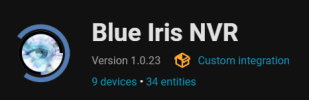
1765728787684.png

Only thing I can do in HA with the old cameras is disable them, not remove them.

I have rebooted BI, reloaded BI Integration in HA, even redownloaded Blue Iris Integration in HACS.

There is no sign of the cameras in my configuration.yaml. I checked the config/blue iris folder, checked each file there, no list of cameras. I don't know where the cameras are are listed, can't find a yaml with them in them or even a .py file, unless I missed one...

Only thing I have not done is start from scratch, that is Request for Removal or Remove:
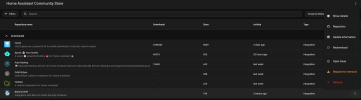
1765729655481.png


Oh, I highly recommend Spook, it is a nice tool from one of the HA developers, will find old unused Entities, Dashboard issues, I am sure a bunch more, I had 4 Repairs after Spook install...

Spook site is vague, had to trust a good friend @pete_c on here that recommended it to me,
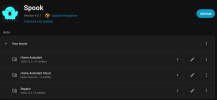
1765730192901.png

Any help on deleting my old cameras in HA is very much appreciated...

 
Before you reloaded the BI integration did you go into your HA file structure and delete the existing /homeassistant/custom_components/blueiris directory?
Thanks, I have not tried that. That will completely wipe BI NVR correct? I am left with deleting it in HACS and reintegrating it. I will have to reset everything back up, I am guessing...which i was hoping to avoid...
 
Thanks, I have not tried that. That will completely wipe BI NVR correct? I am left with deleting it in HACS and reintegrating it. I will have to reset everything back up, I am guessing...which i was hoping to avoid...
That will completely remove the integration, but as long as nothing has changed in BI (camera names and ip addresses) it should retain all of the settings in your automations, dashboards, etc. You'll see some issues generated in spook, but they will go away when you reload the integration and everything should be back to normal. That is as long as you aren't using any of your old cameras you removed somewhere within HA.
 
  • Like
Reactions: David L
That will completely remove the integration, but as long as nothing has changed in BI (camera names and ip addresses) it should retain all of the settings in your automations, dashboards, etc. You'll see some issues generated in spook, but they will go away when you reload the integration and everything should be back to normal. That is as long as you aren't using any of your old cameras you removed somewhere within HA.
Would you happen to know where in HA my cameras are, that is in a yaml or .py? I can't find them. I have looked, My Dashboards are clean of the old cameras and can't see anything in automations...
 
You can delete the entire mqtt db...

/var/lib/mosquitto/mosquitto.db

Currently used mqtt entries will repopulate the db.

then delete the un needed mqtt entries in the BI device list.
 
  • Like
Reactions: David L
You can delete the entire mqtt db...

/var/lib/mosquitto/mosquitto.db

Currently used mqtt entries will repopulate the db.

then delete the un needed mqtt entries in the BI device list.
Too late, lol The problem was in HA, when I deleted the Blue Iris Integration and added it again, all 8 cams showed. So I bit the dust, I deleted BI in HACS. Reinstalled from scratch. Well sure enough the new BI has new IDs for each new camera. So guess what i am doing? Yep, recreating automations and dashboards. I am just glad I only have 4 cameras.

There has to be a better way...but too late for me...

1765765120639.png

Thanks everyone for your help...
 
Are you referring to the Entity ID? If so, you can change it to match whatever you had before.
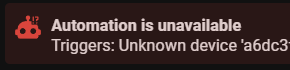
So all my automations I am having to redo, no way to change them, that I can see...

This is a partial # of the Device ID...
1765769242428.png