I've found that that box is good for any turret camera I have installed - from a 5231 to a B54IR-AS S3. I use both the 137 and the PFA130-E with good resultsI have a HDW5231R-Z that I might replace with this camera. With the 5231 camera, I’ve got a weatherproof junction box. Pretty sure it’s this one that’s attached. Does anyone know if the T54IR camera will work with this box?
Review- EmpireTech IPC-T54IR-ZE-S3 4mp Varifocal Turret
- Thread starter looney2ns
- Start date
You are using an out of date browser. It may not display this or other websites correctly.
You should upgrade or use an alternative browser.
You should upgrade or use an alternative browser.


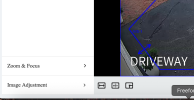
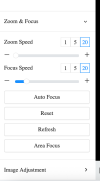
Where exactly in the camera GUI is the option/area to adjust the image (zoom in or out) via the motorized vari-focal lens?
Thanks for the recommendation of this camera.
It is in the live view bottom left.

CCTVCam
Known around here
- Sep 25, 2017
- 3,248
- 4,190
Where exactly in the camera GUI is the option/area to adjust the image (zoom in or out) via the motorized vari-focal lens?
Thanks for the recommendation of this camera.
Just be aware on varifocals it's there purely to zoom and set permanently once you find the best view for you location. It's not a zoom lens to be used for zooming in and out on people, and frequent use may cause failure.
It is in the live view bottom left.
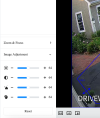
Alright, what am I missing because I don't see that in live view.
Attachments
camarolt1guy
Pulling my weight
Zoom speedAlright, what am I missing because I don't see that in live view.
Ok thanks I got it now. I was thrown off by the zoom speed label. I wasn't expecting that to be it.
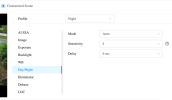
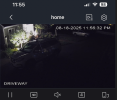
I am having some difficulty getting this camera to switch over to B/W IR at night time. I don't know if I have it set right in the settings but this is how I have it right now.
Right now I am using "customized scene" with the highest sensitivity. When I make and save the changes I can get it to switch to IR but then the following evening it will stay on color mode thus leaving much of the picture dark and hard to see. I do have some landscape lights but these have never been an issue on cameras before and they are not directly shining into the camera.
Any ideas on how to get IR to come on at dark?
Right now I am using "customized scene" with the highest sensitivity. When I make and save the changes I can get it to switch to IR but then the following evening it will stay on color mode thus leaving much of the picture dark and hard to see. I do have some landscape lights but these have never been an issue on cameras before and they are not directly shining into the camera.
Any ideas on how to get IR to come on at dark?
Attachments

Chokolinho
Known around here
I would say by setting it to S/W and not Auto.I am having some difficulty getting this camera to switch over to B/W IR at night time. I don't know if I have it set right in the settings but this is how I have it right now.
Right now I am using "customized scene" with the highest sensitivity. When I make and save the changes I can get it to switch to IR but then the following evening it will stay on color mode thus leaving much of the picture dark and hard to see. I do have some landscape lights but these have never been an issue on cameras before and they are not directly shining into the camera.
Any ideas on how to get IR to come on at dark?

bigredfish
Known around here
S
Set night to B&W not Auto
I am having some difficulty getting this camera to switch over to B/W IR at night time. I don't know if I have it set right in the settings but this is how I have it right now.
Right now I am using "customized scene" with the highest sensitivity. When I make and save the changes I can get it to switch to IR but then the following evening it will stay on color mode thus leaving much of the picture dark and hard to see. I do have some landscape lights but these have never been an issue on cameras before and they are not directly shining into the camera.
Any ideas on how to get IR to come on at dark?
Set night to B&W not Auto
bigredfish
Known around here
Day or night?
Need to see a video clip example with movement to know
There's your 1st problem
Settings are largely untouched from default.
AI SSA is a no-go for me. SHould be for you too until you get passsed Auto settings and have a better understanding of what the settings do
I have used plain SSA in Backlight mode for scenes that need it due to being backlit in place of WDR
Need to see a video clip example with movement to know
There's your 1st problem
Settings are largely untouched from default.
AI SSA is a no-go for me. SHould be for you too until you get passsed Auto settings and have a better understanding of what the settings do
I have used plain SSA in Backlight mode for scenes that need it due to being backlit in place of WDR

Björn0815
Young grasshopper
Hello everyone,
I recently replaced a Hikvision DS-2CD2185FWD-I with an IPC-T54IR-ZE-S3, hoping it would perform better at night. Unfortunately, I made the beginner’s mistake of focusing too much on megapixels and not enough on other factors. As we all know, more megapixels are not always the solution—especially in my case, where the area is completely dark.
That said, the overall result is better than before, and I no longer have the annoying reflections I used to get with the Hikvision dome camera.
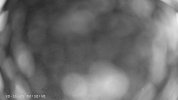
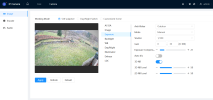
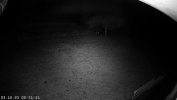
My question now is: is there anything else I can do to improve the illumination on the left and right sides, or would I need additional external IR illuminators? There is already a motion-activated spotlight on the wall (not active in my screenshot), but I’m still curious whether there’s anything I can tweak in the camera settings themselves.
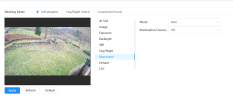
I’ve tried both manual and automatic settings for the built-in illuminator, but they don’t seem to make much difference. At the moment, I have the exposure set to 1/100, which seems like a good compromise: I can still recognize people walking past the camera at night, and the image doesn’t get too dark.
As for the junction box, I personally think the DH-PFA130-E is poorly designed. It’s quite fiddly to work with, because you have to hold the camera “ball” in position with one hand right until the end while tightening the cover with the other. Only then can you screw the camera onto the lid of the junction box, since the camera itself covers the junction box screws. Apart from that, though, the camera is definitely an improvement over the previous one.
I’m also thinking about installing an EmpireTech PTZ6C4G-45X or an EmpireTech PTZ6C2M-45X on the right-hand side under the eaves, so that I can zoom in on different areas. If I’ve understood correctly, these models are supposed to perform very well even in complete darkness, right?
I recently replaced a Hikvision DS-2CD2185FWD-I with an IPC-T54IR-ZE-S3, hoping it would perform better at night. Unfortunately, I made the beginner’s mistake of focusing too much on megapixels and not enough on other factors. As we all know, more megapixels are not always the solution—especially in my case, where the area is completely dark.
That said, the overall result is better than before, and I no longer have the annoying reflections I used to get with the Hikvision dome camera.
My question now is: is there anything else I can do to improve the illumination on the left and right sides, or would I need additional external IR illuminators? There is already a motion-activated spotlight on the wall (not active in my screenshot), but I’m still curious whether there’s anything I can tweak in the camera settings themselves.
I’ve tried both manual and automatic settings for the built-in illuminator, but they don’t seem to make much difference. At the moment, I have the exposure set to 1/100, which seems like a good compromise: I can still recognize people walking past the camera at night, and the image doesn’t get too dark.
As for the junction box, I personally think the DH-PFA130-E is poorly designed. It’s quite fiddly to work with, because you have to hold the camera “ball” in position with one hand right until the end while tightening the cover with the other. Only then can you screw the camera onto the lid of the junction box, since the camera itself covers the junction box screws. Apart from that, though, the camera is definitely an improvement over the previous one.
I’m also thinking about installing an EmpireTech PTZ6C4G-45X or an EmpireTech PTZ6C2M-45X on the right-hand side under the eaves, so that I can zoom in on different areas. If I’ve understood correctly, these models are supposed to perform very well even in complete darkness, right?
Attachments
Hello everyone,
I recently replaced a Hikvision DS-2CD2185FWD-I with an IPC-T54IR-ZE-S3, hoping it would perform better at night. Unfortunately, I made the beginner’s mistake of focusing too much on megapixels and not enough on other factors. As we all know, more megapixels are not always the solution—especially in my case, where the area is completely dark.
That said, the overall result is better than before, and I no longer have the annoying reflections I used to get with the Hikvision dome camera.
My question now is: is there anything else I can do to improve the illumination on the left and right sides, or would I need additional external IR illuminators? There is already a motion-activated spotlight on the wall (not active in my screenshot), but I’m still curious whether there’s anything I can tweak in the camera settings themselves.
I’ve tried both manual and automatic settings for the built-in illuminator, but they don’t seem to make much difference. At the moment, I have the exposure set to 1/100, which seems like a good compromise: I can still recognize people walking past the camera at night, and the image doesn’t get too dark.
As for the junction box, I personally think the DH-PFA130-E is poorly designed. It’s quite fiddly to work with, because you have to hold the camera “ball” in position with one hand right until the end while tightening the cover with the other. Only then can you screw the camera onto the lid of the junction box, since the camera itself covers the junction box screws. Apart from that, though, the camera is definitely an improvement over the previous one.
I’m also thinking about installing an EmpireTech PTZ6C4G-45X or an EmpireTech PTZ6C2M-45X on the right-hand side under the eaves, so that I can zoom in on different areas. If I’ve understood correctly, these models are supposed to perform very well even in complete darkness, right?
You did not make a NOOB mistake in that this camera is the king of the hill. If this one doesn't meet your needs, none will.
It is on the ideal MP/sensor ratio.
Chasing MP and getting cameras on the less than ideal MP/sensor ratio is the beginner mistake.
The PTZ6C4G-45X is not on an ideal MP/sensor ratio and would be a poor choice at night.
Your image is suffering from IR bounce on the soffit above and that is darkening your entire image. Rotate the camera down to get the soffit out of the picture and you will probably see improved performance across the entire field of view.

Hello everyone,
I recently replaced a Hikvision DS-2CD2185FWD-I with an IPC-T54IR-ZE-S3, hoping it would perform better at night. Unfortunately, I made the beginner’s mistake of focusing too much on megapixels and not enough on other factors. As we all know, more megapixels are not always the solution—especially in my case, where the area is completely dark.
That said, the overall result is better than before, and I no longer have the annoying reflections I used to get with the Hikvision dome camera.
My question now is: is there anything else I can do to improve the illumination on the left and right sides, or would I need additional external IR illuminators? There is already a motion-activated spotlight on the wall (not active in my screenshot), but I’m still curious whether there’s anything I can tweak in the camera settings themselves.
I’ve tried both manual and automatic settings for the built-in illuminator, but they don’t seem to make much difference. At the moment, I have the exposure set to 1/100, which seems like a good compromise: I can still recognize people walking past the camera at night, and the image doesn’t get too dark.
As for the junction box, I personally think the DH-PFA130-E is poorly designed. It’s quite fiddly to work with, because you have to hold the camera “ball” in position with one hand right until the end while tightening the cover with the other. Only then can you screw the camera onto the lid of the junction box, since the camera itself covers the junction box screws. Apart from that, though, the camera is definitely an improvement over the previous one.
I’m also thinking about installing an EmpireTech PTZ6C4G-45X or an EmpireTech PTZ6C2M-45X on the right-hand side under the eaves, so that I can zoom in on different areas. If I’ve understood correctly, these models are supposed to perform very well even in complete darkness, right?
Can't quite see what is going on with the daytime image onn the S3, looks kind of grainy?!? The night image looks about what I would expect with no additional IR. The B54 bullet variant has more powerful IR illuminators on board, it would be more suited for this location. But, you can add either additional IR illuminator or floodlight on motion sensor (which I now see you have) for an improvement

Yes the PFA130 is a bit bizarre to install, I normally remove the rubber plug and put it on the front of the box, much easier to install that way, it normally falls inside the box if left factory fit.
That camera is awesome, you definitely didn’t make a mistake but it does need more illumination for where you have it aimed. I would turn off the camera IR and use an external illuminator because it will keep the bugs off the camera and greatly improve your nighttime viewing.Hello everyone,
I recently replaced a Hikvision DS-2CD2185FWD-I with an IPC-T54IR-ZE-S3, hoping it would perform better at night. Unfortunately, I made the beginner’s mistake of focusing too much on megapixels and not enough on other factors. As we all know, more megapixels are not always the solution—especially in my case, where the area is completely dark.
That said, the overall result is better than before, and I no longer have the annoying reflections I used to get with the Hikvision dome camera.
My question now is: is there anything else I can do to improve the illumination on the left and right sides, or would I need additional external IR illuminators? There is already a motion-activated spotlight on the wall (not active in my screenshot), but I’m still curious whether there’s anything I can tweak in the camera settings themselves.
I’ve tried both manual and automatic settings for the built-in illuminator, but they don’t seem to make much difference. At the moment, I have the exposure set to 1/100, which seems like a good compromise: I can still recognize people walking past the camera at night, and the image doesn’t get too dark.
As for the junction box, I personally think the DH-PFA130-E is poorly designed. It’s quite fiddly to work with, because you have to hold the camera “ball” in position with one hand right until the end while tightening the cover with the other. Only then can you screw the camera onto the lid of the junction box, since the camera itself covers the junction box screws. Apart from that, though, the camera is definitely an improvement over the previous one.
I’m also thinking about installing an EmpireTech PTZ6C4G-45X or an EmpireTech PTZ6C2M-45X on the right-hand side under the eaves, so that I can zoom in on different areas. If I’ve understood correctly, these models are supposed to perform very well even in complete darkness, right?
Last edited:
Björn0815
Young grasshopper
Thank you very much for your reply's @wittaj @CamCrazy
Then I’m already relieved that I made a good purchase with this camera
Over the next few days I’ll try tilting the camera a bit further down. I’ll probably lose the country lane at the top left of the image, but it’s quite far away anyway, so a good PTZ might be a better option for that area.
You mentioned that the PTZ6C4G-45X doesn’t have an ideal ratio – should I rather go for a PTZ6C2M-45X, or would you recommend a completely different model for total darkness?
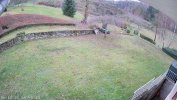
@CamCrazy I’d say that’s only because of the configuration view in the web interface – the image actually looks better in reality (see attachment).
Okay, but I think the main problem is that you can’t first mount the junction box and then attach the camera on top. You kind of have to do everything in one go because the shape of the turret camera blocks the screws of the box cover. I think that’s not the case with the base of a bullet camera, which makes installation easier.
Anyway, thanks for the tip regarding IR illumination with a B54, but I think I’ll just use this one as it is for a while.
Then I’m already relieved that I made a good purchase with this camera
Over the next few days I’ll try tilting the camera a bit further down. I’ll probably lose the country lane at the top left of the image, but it’s quite far away anyway, so a good PTZ might be a better option for that area.
You mentioned that the PTZ6C4G-45X doesn’t have an ideal ratio – should I rather go for a PTZ6C2M-45X, or would you recommend a completely different model for total darkness?
@CamCrazy I’d say that’s only because of the configuration view in the web interface – the image actually looks better in reality (see attachment).
Okay, but I think the main problem is that you can’t first mount the junction box and then attach the camera on top. You kind of have to do everything in one go because the shape of the turret camera blocks the screws of the box cover. I think that’s not the case with the base of a bullet camera, which makes installation easier.
Anyway, thanks for the tip regarding IR illumination with a B54, but I think I’ll just use this one as it is for a while.